
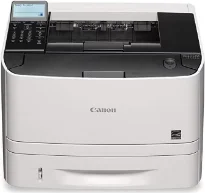
The Canon imageCLASS LBP251dw print model is an ideal choice of a workgroup printer that uses a laser print technology. However, it only prints in black and white as the print method only supports monochrome printing. Also, the machine supports the use of wireless components for connection, in addition to the standard USB. Its mobile printing options include Apple AirPrint, Google Cloud Print, and Mopria Print Service.
Canon imageCLASS LBP251dw Drivers for Windows
d8e463505298f05934015f45615c10b5a46fd76a8891d9656d2715be490786a96e0231df2bc994176723bf67b28263786b2b3e6ac5df81286842a78a1c27114d0a54440677db13a6306081b5281edd2265717657d96e00e05d61cab0fd6ab0b7ab06b4ca4e6b96740e86bc83f313b9da6af77fed24ede730682fd05be1c26baf0d4f501e637282f476f558da6d428a536f40bdaf69f972730f29ca6ed53bfe02a2bc8d3788b40a988e601879c7178b38569e43ea26256cddb57d63fac655fdec64e44aa350b529a66bd231af6902423a022db12268f6c535a88e9095473bd9fbfc5a487dc2c4b5931201355b3424891276dc9d45f801c91e21ce03b1ad5c231b03d06cd9ccd69ae52631051dd223d09446d268467e073d875d526e6836c6aabf7041e132bc8cb51f82da4f68b9431414fb5a3421b8eccf71b772c16d24b7a18557f0f872dd5399978d93341ed0cb55757a432d7fb27ad51a2da192a6b74d580e636afb70d89aad0eddbd50fb1d8a784344bf23a95c5f078a00be3d231680db8ec60ae7abde74362ee1fc65c30bd9d6dbd210613ae7713e332cb28ca73d2602ce04d2e8b6f97ecdbf6149ef728dccd1e27a7ad604327a8fa2972b7d5b6323ac325ce34dce406f36dd4468fa4e86676ad211a0ebe5026fd2007168c92b420d76518489588dc560880fa58e7af3f4a0b67d115b55dfbf3ee02e20ba4e64f1a399d32d97ead841d426ddb38a488cfe967b2b49aa89286fcf271af0ce96685b45ad2c041d82c9bcc80559e68ff68c6ba4ad4b306aa68506bf8ce00e71b99fdb985558cfe557946e69a58fbd83d2cf6ff6641be9e10624362f28ec6d414790303e17c6ec252ebd13b65d30d03910b256ba25720b7f8f84ab958a3e343a9ff44c0198f93ae3a9bec19da4981fa9ffa55ea4f53d8846c5a1f2e740bf9ee2b1e5f1a7507a427b89bc8d04fad2cd44ff669aa188f9c594e14fa7a4377a6036d303db7140f3813d953b761ca70a8d70c2bdd2180478b09313620848f4b541c40880091153931323957bc0dfb873feb7615df02432e15cf188e7fe6cdcac00f6ac0d4566f71d0f9c6406c46b234f582a575d1581efe532fa405c5390a18408e0a3cd074c9611484d887fc334579b3dc3a8bc75da393a9e3965472a7d23778e61bd2de5b0bee22de53dbdd53cae4b58941fad955d291f8b2889cdd6f8d5550b67fdf46185ce3a4fa53803288d165780e30642620fc733296058518e7ae460c263a77588ae1f8bCanon imageCLASS LBP251dw Drivers for macOS
883486e9090fa71b21286a676ceb6794224b0e5126260c6bcab8be3f3bab9b035b8f8de010495b58464dd89bf0ec72e21a931f7476ebec8cf8c194361052d6578c3891f63d4e6b9d23a613adb34a803bd4b45593d9fc0ca658465a0aba1a7ff33cac8d47a0bb1580e74b492bc876858781092e8fae8a009946dc72a2194c0ca9edd8dcff2593c749a946c421f8d3b7484ca2059b0e42799acf81f74ccc168efe5c70ce408e9af249acb1d961605a3c4e4741913910cc53c3a562af0ca8c76e6e3d1cdceea84a542a2f3a87260766b5c9361b29b64316e7ff24d6a98a6826c68d22777e10690dcebdae80b6ec50e7bed2b28b71ca4cf9315646912ab2ad21c066c0f30b290384f17a632ab8d1bb4aaeb3589d0088456996795300daf6874e757fCanon imageCLASS LBP251dw Drivers for Linux
dfd33db96aacd96ba06c0f5bfa11fa9f5d368ef520100c6e5abf900539592e7eCanon imageCLASS LBP251dw Supported Toner Catridges
Black Toner Cartridge 119 : Up to 2,100 Pages and Cartridge 119II Black : Up to 6,400 Pages, with yields in accordance with ISO/IEC Standard
The power usage is through the internal power supply while the operating power consumption is 530 watts. On the other hand, the standby mode only uses an approximate power of 11.7 watts. The rate of printing is 30 pages per minute (ppm) for the simplex mode of monochrome printing. Besides, when the printer is in the duplex mode, the print rate is 16 ppm. It also has a diagonal screen size of 3.5 inches for the LCD screen.
The language simulation options of the machine are the Canon Ultra-Fast Rendering (UFR II), PCL 5e, and PCL 6. In terms of media handling, Canon imageCLASS LBP251dw supports the use of various paper sizes. It can handle up to 250 sheets of plain paper in its input tray. But an additional supply of 50 sheets is available in the multipurpose tray. So, the total media capacity of the machine is up to 300 sheets of plain paper.
This device also supports the use of consumables like a toner cartridge with a capacity of up to 2100 pages. Its networking option includes the print server with a remote management protocol of HTTPS and SNMP 3. Besides, the security protocol features include 802.1x and IPsec while it supports EPEAT silver. As another vital feature, the machine can produce up to 50,000 pages in a month of actual work. It also provides a sound emission of 53 dB at the highest productivity rate.
Technical Details
| Title | Canon imageCLASS LBP251dw Drivers |
|---|---|
| Device Type | Printer |
| Driver Version | Varies by driver and operating system |
| Available Downloads | Drivers |
| License | Free |
| Manufacturer | Canon Inc. |