
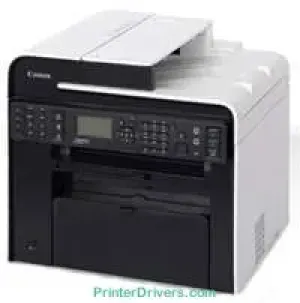
The Canon i-SENSYS MF4890dw printer model is a personal desktop machine that can produce the optimum print output quality. It also has a power voltage support for a range between 220 and 240 volts AC. However, this range of power requirements can vary by the country where the machine is in use. On the other hand, the power consumption also goes by the printer model. For instance, the maximum print consumption is up to 1320 watts or less.
Canon i-SENSYS MF4890dw driver Downloads for Microsoft Windows 32-bit – 64-bit and Macintosh Operating System.
Supported Toner Cartridges
Toner Cartridge 728 Black : Approx 2100 Pages
Canon i-SENSYS MF4890dw Drivers for Windows
fb4892cef370fbd7b6ca28dc0932a61c873ba4a708fe513902132cb11dd58c08fb4892cef370fbd7b6ca28dc0932a61c873ba4a708fe513902132cb11dd58c084d55a4a3e3f5a130bc7a9ccfc5f72f91edf71646e99efe25e959fc74157e973fCanon i-SENSYS MF4890dw Drivers for macOS
d5f10278e0dd91a898757299adb4a566e5f14e6ad073c885da268768b7b8172e0485a03ef39ecfdf93f0d306d06db70162ec51ee6101b8b216a6bf379343eb35503619d05f501b7a04c15b3f849f415878d501725df252139d81841280c628e8ff5d80d992a0f8b003104ffdc1bdf36bfe8bce0aa49cce77b27cdc9a95a5776ca2f4cd0e35483928ff487a3267ea5c930711de5d487220a3d3402f65c263e8e66708a180dad9484c82047dc4624ec4b3dd3438231e6ac5cbcdba793755e1ddb45efcaeccd8b1f1103d2bb966199a47fc50f0116996d987bd51178d61474c2151c98999b876d4bc8928e9adbfd33748039773dbb01850e711679363ae3e93785b8a9fe8a3ad9ee02fb65e10e05eda1e6d8e6ba268fa987a6e164d5ba661bb1240917e7c7089148ed46d637656f66159b2042287e9084b2b921ae5b5f5c0eb0e4837c7892368c2313a0619c97b4f71f32be34757bfcc84538a957d6f23e43e81f0da6c9cbd85a75754061053b0cd0086f0297ea2f9d52a2bb0056fff1438bcff1209431107d2b98a5c1a3d4ae6141590e902abf12a5f16be1d69712e8cfe9845590297641744ea447acd804af112d0693e6588ba52e03feaf0d3150446eb3e84f535dc19aa61aba625226444a79ce3488bb61f99b0c653d1abf054c9b471d5a1b3e65a67c44f07e8c6ecf20e167ae2d83d355023809358287d3a2badbce6507585319819327b889a34a931905184cbeb1e9c986e5d635fa77c88f5de1e424c30886321f7ffd7900bcf8e4b8ce99f0d3d7af91556b836e302306ae8a25a2e16df9de6a48ab862ab2fa01c7793bae9776d4de130b89fe50e189ff8c78d1e5fa6183d9dd3f1b1c7dc175ab7cd4bb929f902c55966150a6a0273dbb36ccad0f146006a360e961225a3a218f8f019abb06cafb6699a0ae2279c20467a32e972a2b98b6d317cf79acc2b5c650f2d0487297a075500cf16bac82b4995036f450d7eb267a802735f008f6d8f5882c2824e3f2b83f7ccf7de77a1e3cca3f3007e0d40da0aefCanon i-SENSYS MF4890dw Drivers for Linux
b7031f9f0aa035cbc5175cb86e3bd83d06f90673a63ea40105ffb5cc6c60237fCanon i-SENSYS MF4890dw Specifications
Furthermore, the average consumption during the standby mode is about 5.0 watts or even less. In comparison, the average power consumption during sleep mode is about 1.4 watts. But when the main power switch is off, the power level of consumption is about 0.5 watts or less. The warm-up time is about 13.5 seconds or less from the time of powering on the machine. Its average weight is about 13.4 kg.
This machine can perform at the optimum level of print. It requires a temperature range between 10 and 300C. Besides, the relative humidity is between 20 and 80% with no condensation. It also has an indirect electrostatic system with on-demand fixing. The main paper tray can load up to 250 sheets of plain paper with a weight between 60 and 80 gsm. The output tray can load up to 100 sheets with an average value of 75 gsm.
The rate of printing with the Canon i-SENSYS MF4890dw model is about 25 pages per minute (ppm). Its first print time for A4 paper printing is about 6 seconds or less. It has an average resolution of 600 x 600 dots per inch (dpi). On the other hand, the maximum print resolution is 1200 x 600 dpi with 256 levels of gradation.
Technical Details
| Title | Canon i-SENSYS MF4890dw Drivers |
|---|---|
| Device Type | All-in-one printer |
| Driver Version | Varies by driver and operating system |
| Available Downloads | Drivers |
| License | Free |
| Manufacturer | Canon Inc. |