
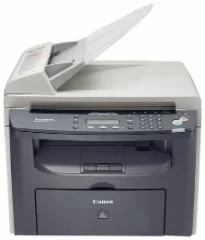
The Canon i-SENSYS MF4330d printer model is a monochrome printer that produces black and white documents in an all-in-one fashion. The machine’s primary features include printing, copying, and scanning documents of excellent quality and speed. This machine can run under printing at a rate of 22 pages per minute (ppm) while working on A4 paper. Simultaneously, it uses a monochrome laser-beam print technology that ensures the optimization of print resources.
Canon i-SENSYS MF4330d Drivers for Windows
e8408ba52503d5073734ce9d5eccc32362ae89f521450069b9a6f1a8ecfd5e51b54a21a93e745b45af5f34d31f0583432c0f0cc12ed774ba4514fe21d83c09444d55a4a3e3f5a130bc7a9ccfc5f72f91edf71646e99efe25e959fc74157e973fCanon i-SENSYS MF4330d Drivers for macOS
21b6eacda90c61ccadc50d0d76781576b8fd553b4a671e3d386f78fad17253b4db4bd12b92b8a2e9c7a25ac0d3bae568b640c30b1739dbb30a4fa5b89a977d2c5b8f8de010495b58464dd89bf0ec72e21a931f7476ebec8cf8c194361052d65735223b2977d71ab373eafd6f14f28daa933cd2dcdc4b0d818da4a4432b143668602bdd48468bf971d46227aeb5a5e80268b4d63683acc1033092bf82e239f06404379ee4276dcb51d3d98f083a64cb6f006f980ebc7cfff7f3b862d6b83fb0adff5d80d992a0f8b003104ffdc1bdf36bfe8bce0aa49cce77b27cdc9a95a5776c02735f008f6d8f5882c2824e3f2b83f7ccf7de77a1e3cca3f3007e0d40da0aef3cac8d47a0bb1580e74b492bc876858781092e8fae8a009946dc72a2194c0ca95efcaeccd8b1f1103d2bb966199a47fc50f0116996d987bd51178d61474c2151320c4de024ab67274bafc210f5d86d82238326f1e858f06eeb520309764f3d393accb0f153300092a2ee312825c851035f1c66d65dafd67c77e2d4fbcd27c13a917e7c7089148ed46d637656f66159b2042287e9084b2b921ae5b5f5c0eb0e484c12283382997a0a253b5b7bedae90cf797892d245c51f896cbbc7eaf39f0d5bab8f0f303177d8c2129a2a2db2b478c6b63e40154d669f8d01041b4f7afcfbb109431107d2b98a5c1a3d4ae6141590e902abf12a5f16be1d69712e8cfe98455901a221888cc3651a64f633e461870d1e2d0cce0ef54abb9c8317ca085ad21964400f046433591f4a0ff3c99e03208e8383398907c9703634230bd5670b241b66e65a67c44f07e8c6ecf20e167ae2d83d355023809358287d3a2badbce65075855afe5cf7fb0b2760c08f60dbce40f1d5569a42ee8c5601b28c28fdbf74dd03b422777e10690dcebdae80b6ec50e7bed2b28b71ca4cf9315646912ab2ad21c06699ef731e893a067c95bad2da00f832d4bbeaf5e23816460edcbcf59778da932ee6a48ab862ab2fa01c7793bae9776d4de130b89fe50e189ff8c78d1e5fa6183dCanon i-SENSYS MF4330d Drivers for Linux
29e2380e21bda8c31f8c08435a2ba49cba61c13abfa47ba78081a9b0e55df333Canon i-SENSYS MF4330d driver Downloads for Microsoft Windows 32-bit – 64-bit and Macintosh Operating System.
Supported Toner Cartridges: FX-10 Black Toner Cartridge : Yields up to 2000 Pages
On average, the print resolution is about 600 x 600 dots per inch (dpi) under ideal conditions. Simultaneously, the maximum print quality is up to 1200 x 600 dpi with an automatic image refinement (AIR) component. It also has a double-sided printing ability for printing on both sides of the paper. Concerning the print margins, the printer supports a margin of 6 mm for the top and bottom. On the other hand, it supports 5 mm for the left and right sides.
The Canon i-SENSYS MF4330d printer has a speed of up to 22 copies per minute (CPM) when using A4 paper as a copier. Simultaneously, the first copy output time (FCOT) for the machine is about 9 seconds or less. Besides, copying has an average resolution of up to 600 x 600 dpi. Copying also supports text, photo, and a combination of text and photo files. Besides, double-sided copying is manual, together with the multiple copy mode that produces up to 99 copies from an original document.
Under scanning, the machine supports color documents while having an optical resolution of 600 x 1200 dpi. On the other hand, the enhanced resolution reaches up to 9600 x 9600 dpi. Its color scanning depth is about 24bit/24bit for the input/output modes. It also supports up to 256 levels of greyscales and is compatible with TWAIN and WIA components.
Technical Details
| Title | Canon i-SENSYS MF4330d Drivers |
|---|---|
| Device Type | All-in-one printer |
| Driver Version | Varies by driver and operating system |
| Available Downloads | Drivers |
| License | Free |
| Manufacturer | Canon Inc. |