
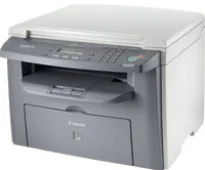
Canon i-SENSYS MF4018 is a monochrome machine that can produce fantastic print output quality in black and white. It is also an all-in-one printer with the print, scan, and copy features to give users the best experience. When using A4 paper, the print rate is 20 pages per minute under ideal conditions. At the same time, it uses monochrome laser-beam printing technology. Furthermore, the average print resolution is about 600 x 600 dots per inch (dpi).
Canon i-SENSYS MF4018 Drivers for Windows
c5e0c5800de336a886d3a00666c6fe63349f806c56d4c5760c7ccfc2914a89aabffccb01935e0318cff45cfa393ed93874b0e4c3f6669668caa08335fb8b474d9e0a235803be9f47a5d243d9335d0f9156f4db43c0d73229137365945e3a335e4d55a4a3e3f5a130bc7a9ccfc5f72f91edf71646e99efe25e959fc74157e973f2a0359c5c0a5c6b5a93dfc61e36370ff55bed699e92dd69f5aa37d5a33b20f66Canon i-SENSYS MF4018 Drivers for macOS
21b6eacda90c61ccadc50d0d76781576b8fd553b4a671e3d386f78fad17253b4db4bd12b92b8a2e9c7a25ac0d3bae568b640c30b1739dbb30a4fa5b89a977d2c5b8f8de010495b58464dd89bf0ec72e21a931f7476ebec8cf8c194361052d65735223b2977d71ab373eafd6f14f28daa933cd2dcdc4b0d818da4a4432b143668602bdd48468bf971d46227aeb5a5e80268b4d63683acc1033092bf82e239f06404379ee4276dcb51d3d98f083a64cb6f006f980ebc7cfff7f3b862d6b83fb0adff5d80d992a0f8b003104ffdc1bdf36bfe8bce0aa49cce77b27cdc9a95a5776c02735f008f6d8f5882c2824e3f2b83f7ccf7de77a1e3cca3f3007e0d40da0aef3cac8d47a0bb1580e74b492bc876858781092e8fae8a009946dc72a2194c0ca95efcaeccd8b1f1103d2bb966199a47fc50f0116996d987bd51178d61474c21513accb0f153300092a2ee312825c851035f1c66d65dafd67c77e2d4fbcd27c13a917e7c7089148ed46d637656f66159b2042287e9084b2b921ae5b5f5c0eb0e484c12283382997a0a253b5b7bedae90cf797892d245c51f896cbbc7eaf39f0d5bab8f0f303177d8c2129a2a2db2b478c6b63e40154d669f8d01041b4f7afcfbb109431107d2b98a5c1a3d4ae6141590e902abf12a5f16be1d69712e8cfe98455901a221888cc3651a64f633e461870d1e2d0cce0ef54abb9c8317ca085ad21964400f046433591f4a0ff3c99e03208e8383398907c9703634230bd5670b241b66e65a67c44f07e8c6ecf20e167ae2d83d355023809358287d3a2badbce6507585b1dd15c6aa590cbdbacae660a75d0e1a14606384a372d54bcf348e8cfe09839c22777e10690dcebdae80b6ec50e7bed2b28b71ca4cf9315646912ab2ad21c066e6a48ab862ab2fa01c7793bae9776d4de130b89fe50e189ff8c78d1e5fa6183dCanon i-SENSYS MF4018 Drivers for Linux
29e2380e21bda8c31f8c08435a2ba49cba61c13abfa47ba78081a9b0e55df333Canon i-SENSYS MF4018 driver Downloads for Microsoft Windows 32-bit – 64-bit and Macintosh Operating System.
Toner Cartridge Details
Toner Cartridge FX-10 Black : Page Yield: Upto 2000 pages
The maximum print output resolution of this printer is up to 1200 x 600 dpi with the automatic image refinement (AIR) component. Its compatible printer languages include the UFR II LT, which is essential for monochrome printing. It also allows a print margin of 6 mm for the top and bottom sides of the paper. On the other hand, the print margin is up to 5 mm for the left and right sides. The device also has a toner saver mode for maintaining optimum print performance.
Under copying specifications, the Canon i-SENSYS MF4018 model can run at the rate of 20 copies per minute (CPM). This rate also applies to the use of A4 paper. Besides, the first copy output time from this machine is approximately 9 seconds or even less. The copy modes include text, text/photo, text/photo+, and photo file types. It also supports both 1-sided and 2-sided manual copying in addition to the multiple copy feature.
Concerning the paper standard specifications, the main paper tray can accommodate 250 sheets of plain paper. In addition to the main supply, the machine allows a manual feed slot that can take one sheet at a time. In comparison, the paper output tray can take up to 100 sheets of printed pages. The supported media types include plain, heavy paper, recycled paper, transparency, label, and envelopes.
Technical Details
| Title | Canon i-SENSYS MF4018 Drivers |
|---|---|
| Device Type | All-in-one printer |
| Driver Version | Varies by driver and operating system |
| Available Downloads | Drivers |
| License | Free |
| Manufacturer | Canon Inc. |