
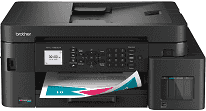
Brother MFC-T980DW Driver lets the computer send print, scan, copy, and fax commands to this multifunction inkjet machine. Once installed, the operating system can identify each function instead of treating the unit as an unknown device. A nearby computer may use USB, while Ethernet links the printer to a wired network. Wireless jobs can also travel over Wi-Fi without a cable between the computer and printer. The same software returns scanned files and passes fax data through the active connection.
Brother MFC-T980DW Drivers for Windows
ca6b48c954b3069ef2ea7683eed73d41b14546156ee84ef798ba7e6cfb6a6be00f3ca9cfa40ff9c3d0b2b6297d595dce4c9fb2d0df62cc54db44f72ebd7a35ab0f3ca9cfa40ff9c3d0b2b6297d595dce4c9fb2d0df62cc54db44f72ebd7a35ab0edce9170c3f46f065e52aa6335c093befa453212698a94c7d59fcfc5197fa7e71169ef33cab91b5dc1e848ff483c40ad2eec7be44e69fcb0c084a590a79b49eBrother MFC-T980DW Drivers for macOS
773ad2931a84cc8609e54be2536d12581ed89a4f42c030c78efa22cf0832e106Brother MFC-T980DW Drivers for Linux
37728d73bb4c28e1f5ea1cafd856b784c37e95bd6666faa3c6c2b9788f0393102c8ef6720b316ad744919f4951380e7932be2a8178f085aa2ef9b33006bae9709c3a200db3dc7b2b3332dff8c5226b4f3ee560d20b2e1f4918b1faf7124517b2197f63a52e89b8744f5a3c2d843abb3b76d003d5d4830bdfe675c44841a6c72bcda25534ea8e3018e7d46b970cb08b36084355adedc933aba0c8c7d03e903db901dc859f1978e645147ced5ec4b5448cc3e26b1c6d2f1104834f5891c0e17469d724746540a51f8286f2a318b47657227f7131d384a1a4f0475dacb7e3580f3ee74ef3a5529ebf3b26d6139ce15d75374a4538ba2efd48c28b209b0d705e5ec72ba3bffcf199fee6387cb79d6923214648db0f2df1c5a13f8f8f0a6fe0995c401404f2622e60470b4de25d0cdb4adc0f130ace6b380cc0d4b3d7714ad761c1aee28a8765f6637456d81ad1a56226e6857be2f1581fdcd9e4a5a4fbc4c42dd3450a4412b306b9ce2eb7e3ef4734a7b648f9561f525922b02541e98b545929dc2b82aa17ba2e331de1fcb34f0a839d27b9b193ac680d9742250a89e588a6bd56206c4e17c6dbcf263d9d08fb460ccd5b9f1a23fce79b30d0a41d96a224839322b2Brother MFC-T980DW Specifications
The Brother MFC-T980DW combines color inkjet printing with scanning, copying, and faxing. Four refillable tanks supply black, cyan, magenta, and yellow ink to piezo printheads. Internal processing uses 128 MB of memory, and a 1.8-inch TFT color LCD carries the main controls. Above the flatbed, a 20-sheet automatic document feeder moves multi-page originals through without placing each sheet on the glass.
Maximum print resolution reaches 1200 × 6000 dpi. Automatic duplexing is limited to plain or recycled Letter, A4, Executive, and A5 sheets. Borderless output is available on selected document, photo, and index-card sizes rather than every paper setting. The flatbed scans at 1200 × 2400 dpi, and copy jobs can contain up to 99 pages. Resizing runs from 25% to 400% in one-percent steps.
The main tray holds 150 plain sheets, while the multi-purpose tray takes up to 80. Paper larger than Letter or A4 must enter that second tray one sheet at a time. It accepts common office stock as well as coated inkjet, glossy, and recycled paper. Legal sheets, envelopes, photo paper, and index cards also fit, although loading depends on the chosen tray. Printed output collects in a 50-sheet tray, well below the combined input capacity.
A nearby computer can use the Hi-Speed USB 2.0 connection. Ethernet and wireless LAN place the machine on a local network, and Wi-Fi Direct permits a direct wireless link without the router. Network functions extend beyond printing to scanning and PC-Fax transmission or reception. The front USB host port reads JPEG photos and stores scanned files on compatible flash drives. Weight is listed at 21.8 lb. Power use drops from about 16 W during copying to 3.5 W in ready mode, 0.8 W in sleep, and 0.10 W after shutdown.
Technical Details
| Title | Brother MFC-T980DW Drivers |
|---|---|
| Device Type | All-in-one printer |
| Driver Version | Varies by driver and operating system |
| Available Downloads | Drivers |
| License | Free |
| Manufacturer | Brother Industries, Ltd. |