
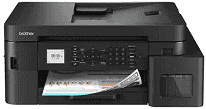
Brother MFC-T930DW Driver functions as a medium for successful communication between the computer and the all-in-one printer for the purpose of printing, scanning, copying, and faxing. After installation of the software, the system is able to recognize the hardware through the use of a USB cable or Wi-Fi connectivity. The print, scan, copy, and fax requests are sent to the printer successfully.
Brother MFC-T930DW Drivers for Windows
ca6b48c954b3069ef2ea7683eed73d41b14546156ee84ef798ba7e6cfb6a6be00f3ca9cfa40ff9c3d0b2b6297d595dce4c9fb2d0df62cc54db44f72ebd7a35ab0f3ca9cfa40ff9c3d0b2b6297d595dce4c9fb2d0df62cc54db44f72ebd7a35ab0edce9170c3f46f065e52aa6335c093befa453212698a94c7d59fcfc5197fa7e71169ef33cab91b5dc1e848ff483c40ad2eec7be44e69fcb0c084a590a79b49eBrother MFC-T930DW Drivers for macOS
773ad2931a84cc8609e54be2536d12581ed89a4f42c030c78efa22cf0832e106Brother MFC-T930DW Drivers for Linux
955c2069c958e67ee667943867d3278321c3ed083df36bb4dbac0a32a1700bdac28fc4e6fdcfd57873771697733aea6b2db77fb31d21c692d3407ec0dcd2d5159c3a200db3dc7b2b3332dff8c5226b4f3ee560d20b2e1f4918b1faf7124517b2197f63a52e89b8744f5a3c2d843abb3b76d003d5d4830bdfe675c44841a6c72bcda25534ea8e3018e7d46b970cb08b36084355adedc933aba0c8c7d03e903db901dc859f1978e645147ced5ec4b5448cc3e26b1c6d2f1104834f5891c0e17469d724746540a51f8286f2a318b47657227f7131d384a1a4f0475dacb7e3580f3ee74ef3a5529ebf3b26d6139ce15d75374a4538ba2efd48c28b209b0d705e5ec72ba3bffcf199fee6387cb79d6923214648db0f2df1c5a13f8f8f0a6fe0995c401404f2622e60470b4de25d0cdb4adc0f130ace6b380cc0d4b3d7714ad761c1aee28a8765f6637456d81ad1a56226e6857be2f1581fdcd9e4a5a4fbc4c42dd3450a4412b306b9ce2eb7e3ef4734a7b648f9561f525922b02541e98b545929dc2b82aa17ba2e331de1fcb34f0a839d27b9b193ac680d9742250a89e588a6bd56206c4e17c6dbcf263d9d08fb460ccd5b9f1a23fce79b30d0a41d96a224839322b2Brother MFC-T930DW Specifications
Brother MFC-T930DW is a refillable ink tank multifunction printer that incorporates printing, scanning, copying, and faxing operations. The printer is equipped with an inkjet print engine having a maximum resolution of 1,200 x 6,000 dpi. It is accompanied by 128 MB of memory. Local control is provided by means of a 1.8-inch color LCD on the control panel. Scanning is performed with the help of a flatbed scanner combined with a 20-page automatic document feeder. Thus, multiple-page originals can be fed to the feeder rather than being placed on the glass one-by-one. Fax functions are built into the printer.
Maximum print speeds are 17.0 ipm (monochrome) and 16.5 ipm (color). In Eco Mode, output speeds are increased up to 30 ppm (monochrome) and 26 ppm (color). Scanning resolutions are 1,200 x 2,400 dpi. Maximum copying capabilities are also equal to 1,200 x 2,400 dpi, with enlargements/reductions possible between 25% and 400%. Borderless printing is available for A4 and Letter papers.
A 150-sheet front cassette is the primary input tray. An 80-sheet multipurpose tray handles plain and glossy papers. Printed copies are stored in the 50-sheet output tray. Automatic duplex printing is possible for double-sided printing on A4/Letter papers. A 20-sheet capacity is set for the automatic document feeder.
The printer can be connected to the local computer by way of High-Speed USB 2.0 or Fast Ethernet. Wireless printing is also available through dual-band Wi-Fi or Wi-Fi Direct connections. The printer is compatible with such applications as Brother Mobile Connect, AirPrint, Mopria, and Brother Print Service Plugin. JPEG files can be printed from the front USB host port of the printer. Dimensions are 435 x 418 x 180 mm, and weight is 9.7 kg. Monthly duty cycle is set at 2,500 pages.
Technical Details
| Title | Brother MFC-T930DW Drivers |
|---|---|
| Device Type | All-in-one printer |
| Driver Version | Varies by driver and operating system |
| Available Downloads | Drivers |
| License | Free |
| Manufacturer | Brother Industries, Ltd. |