
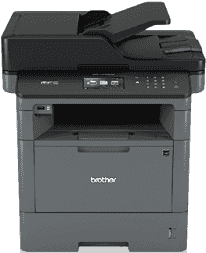
Printing with the Brother MFC-L5700DW model comes with ease, with the new specifications of the model. The printer type is laser technology with the modern electrophotographic print method. The device also has a memory capacity of up to 256 MB of RAM which supports its processor for a good print. Also, it has a display component comprising a liquid crystal display (LCD) of a color TFT touchscreen.
Brother MFC-L5700DW Drivers for Windows
f88988462d7a689ff9ed017283334c993af150093ea881eeff57a39ffdd7e0c38bf9b3eaa473ffcbc6b3ab6d6040a21176cd619e9f4057ee117c131798b681e18bf9b3eaa473ffcbc6b3ab6d6040a21176cd619e9f4057ee117c131798b681e1Brother MFC-L5700DW Drivers for macOS
f3a27f3126f7b3b5a04e0481ad743564f6fd1d6e039ec33ec3c687af15a1aa0aab64878616f2d0ddbf65ea85e386b8e122bd5549079ad82012a8d47a21079c992b229ea56fe0606c51a04cf94f9d615a96308c25f6e7574d3490237b47e68261e0c68c4dc939326de2735539c973e4f61ad2c147df5bb7b80127e7286875d4866a9ef2865964ff4918dd1441876a80485fb8c329df36aa8d6680deff2eecd53eca480ce9440707809aa790176090bcc09002f9e19eb58a1631501afe78707deeccdacb0e41d0087152dd86a37ab0ed248a7743711ca031efebc0e68d26c3a5869b042362a8c1fd58d9de51491ce470f6c8c4768fe89b4d850027c6b96acb24a7354db739eab00a61c32517b4a4208b156e5cb868af4942f3f307f0dd7ff90d3d8916be8720d64390e65126bf4c8dce493929c07838ec2ca12e1c2b50490b28c54b1e4d84faa973d7f7a1cdd8d03261389e25426abe89c02c6157a62c831a84fac806162e0f8a2948c48a68d8679445290b894e6193b40661706897d3fa9f672f67fc9252f2235c91dc8f270bea88d1ceb067770484c4838eb35b74e1370a90ddBrother MFC-L5700DW Drivers for Linux
baeae43c128fe795adcca963182d7e1a8d061cba051c7787c6b447a30dba05ddf99386adc1b94287291b3a6d3a367ed07990f4a4cf7a198f2ce80a288394d546b76038db104fd7af938a16b8805dfa4e1f974e06caf11d2fcccb85289ab20b8cfd8bad33fa79dac69f27e5112bd0d1a0a3d46b967e2eaba3c8df06eadeded28a027b73648722ac8c8eb1a9c419d284a6562cc763feac9740a2b75a683b0929727d7dcbe8349ae4d4ab816e4551017f2f1fd9fd6bf3f4f3c570fbd9576248dd9f4225e91dd7f7d0ba2a202f616b15b669be7800c271a7d25efed94191f71fc4508bd395b8a25a385eb4a5e2770d4b10b17735203006b7a90a6879a0ef69e5fe4df71dadda535bb90dbfaf88fd603897f96e8b09a2f3ae9bd4e2daafb925e896e24082d824222ec7a7646309260fd661387ca1aa5dc1ffe851db7bbefe5271b755Brother MFC-L5700DW Specifications
The power source that supplies energy into this Brother MFC-L5700DW printer can only be within the range of 110 to 120 volts. This feature has a frequency of 50 or 60 Hz on the average. In terms of the peak performance of the printer, the power consumption is up to 1248 watts. However, copying and printing in normal mode use up to 630 watts at a temperature of 25°C. However, when the two processes quietly take place, power consumption is only 375 watts. The sleep mode uses only 8.4 watts; the deep sleep mode requires 1.6 watts, and the power off mode, 0.03 watts.
In terms of physical qualities, the printer has a width of 16.8 inches and a depth of 17.1 inches. The height of the printer is up to 19.1 inches while the weight is about 36.2 lbs (16.4 kg). The print media specifications include support for plain, recycled, thin, thick, letterhead, and colored papers. The paper weight should be between 16 and 32 lbs, which is about 60 to 120 gsm. The maximum input tray holding capacity is about 250 sheets of plain paper.
The Brother MFC-L5700DW printer also has a multipurpose tray that accommodates up to 50 sheets extra for input supply. In this same tray, the supported paper types remain the same with a maximum weight of 53 lbs. This MP tray can also take ten envelope sizes up to 0.4 inches thick.
Technical Details
| Title | Brother MFC-L5700DW Drivers |
|---|---|
| Device Type | All-in-one printer |
| Driver Version | Varies by driver and operating system |
| Available Downloads | Drivers |
| License | Free |
| Manufacturer | Brother Industries, Ltd. |