
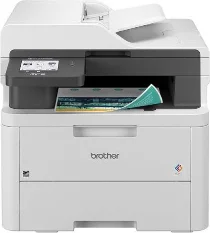
Brother MFC-L3720CDW Driver lets the computer send commands correctly to this colour all-in-one laser printer. After installation, the operating system can identify the MFC-L3720CDW for printing, scanning, copying, and faxing. A nearby computer may use USB, while network work can run through Ethernet or Wi-Fi. The driver passes print settings, scan requests, copy controls, and fax commands to the correct device functions.
Brother MFC-L3720CDW Drivers for Windows
632866c8138eb66d9871b6687eee860d0f5c4b8c3cb95ebd2147fef6644423daf7d5f637e7573800301b51df2b041fa361836ae71b55854d8fec0a1f2eedde20f7d5f637e7573800301b51df2b041fa361836ae71b55854d8fec0a1f2eedde20b15919b465d9b8479440f7076ac5026e2b6f3dfb04f30d6de4ffca85d9a976b86eddedfff4131bc903d581f6dc86a8518e1c82980a4cd38b4396c4c1bb1338d3ee2cabe92d46f7f6804a469fbdf46bfefbc58df649a126f936d83c3cc990a4ef5f3ad9dd0475f7524f0e489aa7076da168c228bcd22031394a53fad4b9a2573f0917273bb5bc10ee4775f36bd98bd05152835bf5370614cf5a803ffa9260b0adBrother MFC-L3720CDW Drivers for macOS
2df1d72e004f41ab3802d865b58b32bb5dcd40cd9c97b538571730ee890ea7e9Brother MFC-L3720CDW Drivers for Linux
644eb1af997105c20309b2a3cd82f3509d2b1b95e7d772607ae3cebb60a7ee49dcfc1cbd47a5eaac4b30a599696e0a1b641813008138c1aaced7193032b8c5f29c3a200db3dc7b2b3332dff8c5226b4f3ee560d20b2e1f4918b1faf7124517b2197f63a52e89b8744f5a3c2d843abb3b76d003d5d4830bdfe675c44841a6c72bcda25534ea8e3018e7d46b970cb08b36084355adedc933aba0c8c7d03e903db901dc859f1978e645147ced5ec4b5448cc3e26b1c6d2f1104834f5891c0e17469d724746540a51f8286f2a318b47657227f7131d384a1a4f0475dacb7e3580f3ee74ef3a5529ebf3b26d6139ce15d75374a4538ba2efd48c28b209b0d705e5ec72ba3bffcf199fee6387cb79d6923214648db0f2df1c5a13f8f8f0a6fe0995c401404f2622e60470b4de25d0cdb4adc0f130ace6b380cc0d4b3d7714ad761c1aee28a8765f6637456d81ad1a56226e6857be2f1581fdcd9e4a5a4fbc4c42dd3450a4412b306b9ce2eb7e3ef4734a7b648f9561f525922b02541e98b545929dc2b82aa17ba2e331de1fcb34f0a839d27b9b193ac680d9742250a89e588a6bd56206c4e17c6dbcf263d9d08fb460ccd5b9f1a23fce79b30d0a41d96a224839322b2Brother MFC-L3720CDW Specifications
The Brother MFC-L3720CDW is a color LED all-in-one with print, scan, copy, and fax functions. Its electrophotographic LED engine works with 512 MB of memory and a 3.5-inch TFT color touchscreen. Separate black, cyan, magenta, and yellow toner cartridges handle output, while the drum, belt unit, and waste toner box remain replaceable maintenance parts. Fax hardware is built into the MFC body.
Print resolution reaches 600 x 600 dpi, with 2,400 dpi class quality from 600 x 2,400 dpi processing. Mono and color speeds run up to 19 ppm on Letter paper and 18 ppm on A4. Automatic duplex printing reaches up to 7 sides per minute. First print time is less than 15 seconds. From the glass, scanning records up to 1,200 x 1,200 dpi.
Paper input comes from a 250-sheet standard tray, while a manual feed slot accepts one sheet or envelope at a time for smaller jobs. Finished pages collect in a 150-sheet face-down output tray, and a rear face-up path handles one sheet. Tray sizes include A4, Letter, Legal, Executive, Folio, A5, A6, B5, B6, Mexico Legal, India Legal, and 16K for regional office paper.
The 50-sheet automatic document feeder accepts originals from 4.1 to 8.5 inches wide and 5.8 to 14 inches long. Connections run through Hi-Speed USB 2.0, dual-band wireless LAN, and Wi-Fi Direct, but wired Ethernet is not part of this model. Mobile printing works with AirPrint, Brother Mobile Connect, and Mopria, while physical measurements are 16.1 x 15.8 x 17.5 inches and weight is about 44.0 lb including supplies.
Technical Details
| Title | Brother MFC-L3720CDW Drivers |
|---|---|
| Device Type | All-in-one printer |
| Driver Version | Varies by driver and operating system |
| Available Downloads | Drivers |
| License | Free |
| Manufacturer | Brother Industries, Ltd. |