
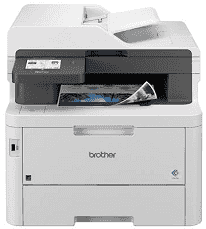
Brother MFC-L3780CDW Driver links the computer with the machine’s print, scan, copy, and fax functions. After installation, print jobs can reach the color laser engine, while scan data returns from the document glass or automatic document feeder. A computer can connect by USB or Ethernet, and wireless jobs can travel across the local Wi-Fi network. Proper device recognition also gives software access to the separate functions instead of treating the MFC-L3780CDW as an unidentified printer.
Brother MFC-L3780CDW Drivers for Windows
a5ee9199d2db8f2246b52c011e32a319ab9810ee02273dd38af10c11e207b8cbf7d5f637e7573800301b51df2b041fa361836ae71b55854d8fec0a1f2eedde20f7d5f637e7573800301b51df2b041fa361836ae71b55854d8fec0a1f2eedde20b15919b465d9b8479440f7076ac5026e2b6f3dfb04f30d6de4ffca85d9a976b86eddedfff4131bc903d581f6dc86a8518e1c82980a4cd38b4396c4c1bb1338d3ee2cabe92d46f7f6804a469fbdf46bfefbc58df649a126f936d83c3cc990a4ef5f3ad9dd0475f7524f0e489aa7076da168c228bcd22031394a53fad4b9a2573f0917273bb5bc10ee4775f36bd98bd05152835bf5370614cf5a803ffa9260b0adBrother MFC-L3780CDW Drivers for macOS
3bac9ee7ab69c1c274ab5a54a6309f8cd4dd9a3d30fb991cfff30803a30fc38eBrother MFC-L3780CDW Drivers for Linux
0973b0836578c0c3b55298b07046a86d5c57eea9d7118d20f06cfb68bc35ffecc32a1ceaeb8242c322f711de6060033a3b44e89708ac25524cd773bd59ff2e3e9c3a200db3dc7b2b3332dff8c5226b4f3ee560d20b2e1f4918b1faf7124517b2197f63a52e89b8744f5a3c2d843abb3b76d003d5d4830bdfe675c44841a6c72bcda25534ea8e3018e7d46b970cb08b36084355adedc933aba0c8c7d03e903db901dc859f1978e645147ced5ec4b5448cc3e26b1c6d2f1104834f5891c0e17469d724746540a51f8286f2a318b47657227f7131d384a1a4f0475dacb7e3580f3ee74ef3a5529ebf3b26d6139ce15d75374a4538ba2efd48c28b209b0d705e5ec72ba3bffcf199fee6387cb79d6923214648db0f2df1c5a13f8f8f0a6fe0995c401404f2622e60470b4de25d0cdb4adc0f130ace6b380cc0d4b3d7714ad761c1aee28a8765f6637456d81ad1a56226e6857be2f1581fdcd9e4a5a4fbc4c42dd3450a4412b306b9ce2eb7e3ef4734a7b648f9561f525922b02541e98b545929dc2b82aa17ba2e331de1fcb34f0a839d27b9b193ac680d9742250a89e588a6bd56206c4e17c6dbcf263d9d08fb460ccd5b9f1a23fce79b30d0a41d96a224839322b2Brother MFC-L3780CDW Specifications
The Brother MFC-L3780CDW is a color LED all-in-one with printing, scanning, copying, and fax hardware. Its electrophotographic LED engine uses four separate toner cartridges, and the controller carries 512 MB of memory. A 3.5-inch color touchscreen provides the main controls. Above the flatbed, a 50-sheet automatic document feeder takes multipage originals and can read both sides of a sheet in a single pass for scanning, copying, or faxing.
Letter-size printing runs at up to 31 pages per minute in either black or color, with output rated at up to 2400 x 600 dpi-class quality. Automatic duplex printing reaches 12 sides per minute on Letter or A4 sheets. Scanning from the flatbed reaches 1200 x 1200 dpi. The document feeder uses up to 600 x 600 dpi, but its single-pass duplex mechanism saves the need to turn two-sided originals over by hand.
The main paper tray holds 250 sheets. A separate 30-sheet multipurpose tray is used for smaller or less routine stock, including envelopes and labels; glossy paper can also feed there. Finished pages land face down in a 150-sheet output tray. For larger paper loads, Brother lists an optional 250-sheet lower tray. Automatic duplex printing accepts Letter and Legal paper in the U.S. configuration.
A nearby computer can connect over Hi-Speed USB 2.0, and Gigabit Ethernet serves a wired network. Wireless jobs can use dual-band Wi-Fi or Wi-Fi Direct, so a direct device connection does not depend on the normal wireless network. NFC is also built into the machine for compatible authentication use. The body measures 16.1 x 18.2 x 15.8 inches and weighs 47.8 pounds with standard supplies installed. Brother rates the maximum monthly duty cycle at 50,000 pages, although its recommended monthly print volume is up to 4,000 pages.
Technical Details
| Title | Brother MFC-L3780CDW Drivers |
|---|---|
| Device Type | All-in-one printer |
| Driver Version | Varies by driver and operating system |
| Available Downloads | Drivers |
| License | Free |
| Manufacturer | Brother Industries, Ltd. |