
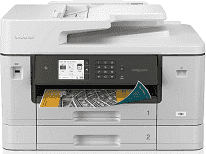
Brother MFC-J6940DW Driver helps the computer send setup and print commands correctly to this all-in-one printer. After the computer recognizes the machine, printing, scanning, copying, and faxing can be started from the connected system. A USB cable suits a nearby computer. Network jobs need steady wired or wireless communication so paper size, source, and output choices reach the printer correctly.
Brother MFC-J6940DW Drivers for Windows
1a49ac52b7a570e189cea33672d1ef66b3740a177477fb883a4d8b00bdb16a9b76ddc3d3ac00c5aeb5f775581dd2d992d55d4406acb173225462f73ae3dcbd7976ddc3d3ac00c5aeb5f775581dd2d992d55d4406acb173225462f73ae3dcbd790edce9170c3f46f065e52aa6335c093befa453212698a94c7d59fcfc5197fa7ec3db3f10657ece97a5dbae2b5490dd24b3691426d6add2c17e1cc1c2fc8b609d71169ef33cab91b5dc1e848ff483c40ad2eec7be44e69fcb0c084a590a79b49eBrother MFC-J6940DW Drivers for macOS
5d09788e98b2c9e91b297e4245f410a6e990743dddec3a740d0cf6a3735ae782Brother MFC-J6940DW Drivers for Linux
923c21f2ee285fe01ef1f638a50c7b12f5941558770a53311c8a8937fde4acffcd48cc94c232f4274669533c9e25803fa29db7a51a390e9c9227b722cc145bca9c3a200db3dc7b2b3332dff8c5226b4f3ee560d20b2e1f4918b1faf7124517b2197f63a52e89b8744f5a3c2d843abb3b76d003d5d4830bdfe675c44841a6c72bcda25534ea8e3018e7d46b970cb08b36084355adedc933aba0c8c7d03e903db901dc859f1978e645147ced5ec4b5448cc3e26b1c6d2f1104834f5891c0e17469d724746540a51f8286f2a318b47657227f7131d384a1a4f0475dacb7e3580f3ee74ef3a5529ebf3b26d6139ce15d75374a4538ba2efd48c28b209b0d705e5ec72ba3bffcf199fee6387cb79d6923214648db0f2df1c5a13f8f8f0a6fe0995c401404f2622e60470b4de25d0cdb4adc0f130ace6b380cc0d4b3d7714ad761c1aee28a8765f6637456d81ad1a56226e6857be2f1581fdcd9e4a5a4fbc4c42dd3450a4412b306b9ce2eb7e3ef4734a7b648f9561f525922b02541e98b545929dc2b82aa17ba2e331de1fcb34f0a839d27b9b193ac680d9742250a89e588a6bd56206c4e17c6dbcf263d9d08fb460ccd5b9f1a23fce79b30d0a41d96a224839322b2Brother MFC-J6940DW Specifications
The Brother MFC-J6940DW is a color inkjet all-in-one built for print, scan, copy, and fax work on pages as large as ledger. Printing comes from a piezo print head, with 420 nozzles for black ink and 420 nozzles for each color channel. Inside the body, 256 MB of memory backs the walk-up functions. The 3.5-inch color touchscreen carries shortcuts, status checks, cloud tasks, and NFC control, so most common jobs do not have to start from a computer.
Print output reaches 1200 x 4800 dpi, and Brother rates both black and color ISO pages at up to 28 pages per minute. Scanning can start from the glass or from the 50-page automatic document feeder. The flatbed records up to 1200 x 2400 dpi optical resolution, which suits single originals that need the higher scan setting. The feeder drops to 600 x 600 dpi, but it keeps multi-page jobs moving without placing each sheet by hand. Copy scaling runs from 25% to 400%, with stacking or sorting for jobs up to 999 pages.
Paper loading is split between two 250-sheet front trays and a 100-sheet multipurpose tray at the rear. Tray 1 takes small photo paper as well as A3 and ledger sheets. Tray 2 is meant for plain or recycled office paper, from A5 and letter through legal, ledger, and A3. Specialty sheets move to the multipurpose feed. That rear path takes envelopes, glossy stock, index cards, and one long sheet up to 47.2 inches.
Automatic two-sided printing works on plain or recycled paper up to ledger and A3, which matters for large duplex documents. The ADF also handles single-pass duplex scanning, copying, and faxing, so both sides of a page can be read in one pass. A nearby computer can use Hi-Speed USB 2.0. Office networks can use Ethernet, Wi-Fi, or Wi-Fi Direct, with Wi-Fi Direct useful when a router connection is not available. The front USB port prints JPEG files from a flash drive and can save scans back to it. Power draw is about 30 W during copying, 5 W in ready mode, and 0.9 W in sleep mode.
Technical Details
| Title | Brother MFC-J6940DW Drivers |
|---|---|
| Device Type | All-in-one printer |
| Driver Version | Varies by driver and operating system |
| Available Downloads | Drivers |
| License | Free |
| Manufacturer | Brother Industries, Ltd. |