
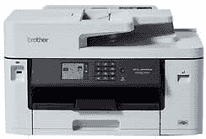
The Brother MFC-J5340DW Driver lets a computer send print, scan, copy, and fax commands to this multifunction inkjet machine. A nearby computer can connect by USB, or the printer can join a wired network. Wireless setup is available when a cable connection is not practical. Once the correct connection is established, the computer can identify the machine and pass document jobs to the required function.
Brother MFC-J5340DW Drivers for Windows
1a49ac52b7a570e189cea33672d1ef66b3740a177477fb883a4d8b00bdb16a9b76ddc3d3ac00c5aeb5f775581dd2d992d55d4406acb173225462f73ae3dcbd7976ddc3d3ac00c5aeb5f775581dd2d992d55d4406acb173225462f73ae3dcbd790edce9170c3f46f065e52aa6335c093befa453212698a94c7d59fcfc5197fa7ec3db3f10657ece97a5dbae2b5490dd24b3691426d6add2c17e1cc1c2fc8b609d71169ef33cab91b5dc1e848ff483c40ad2eec7be44e69fcb0c084a590a79b49eBrother MFC-J5340DW Drivers for macOS
5d09788e98b2c9e91b297e4245f410a6e990743dddec3a740d0cf6a3735ae782Brother MFC-J5340DW Drivers for Linux
555ab952b71d69a837ac07ec583b6bf3f1e12d2c4e89749c6b08719b24b818432ab8390f6bada16dd8ed31c516d4ac7001994d7fe78163bdf51e8ffa49fdbce89c3a200db3dc7b2b3332dff8c5226b4f3ee560d20b2e1f4918b1faf7124517b2197f63a52e89b8744f5a3c2d843abb3b76d003d5d4830bdfe675c44841a6c72bcda25534ea8e3018e7d46b970cb08b36084355adedc933aba0c8c7d03e903db901dc859f1978e645147ced5ec4b5448cc3e26b1c6d2f1104834f5891c0e17469d724746540a51f8286f2a318b47657227f7131d384a1a4f0475dacb7e3580f3ee74ef3a5529ebf3b26d6139ce15d75374a4538ba2efd48c28b209b0d705e5ec72ba3bffcf199fee6387cb79d6923214648db0f2df1c5a13f8f8f0a6fe0995c401404f2622e60470b4de25d0cdb4adc0f130ace6b380cc0d4b3d7714ad761c1aee28a8765f6637456d81ad1a56226e6857be2f1581fdcd9e4a5a4fbc4c42dd3450a4412b306b9ce2eb7e3ef4734a7b648f9561f525922b02541e98b545929dc2b82aa17ba2e331de1fcb34f0a839d27b9b193ac680d9742250a89e588a6bd56206c4e17c6dbcf263d9d08fb460ccd5b9f1a23fce79b30d0a41d96a224839322b2Brother MFC-J5340DW Specifications
The Brother MFC-J5340DW is a colour inkjet multifunction machine that prints, scans, copies, and faxes. Its piezo printhead uses 420 nozzles for black and the same count for each colour, backed by 256 MB of memory. A 2.7-inch colour touchscreen sits on the front panel. Above the scanner glass, a 50-sheet automatic document feeder takes care of longer originals without placing every page by hand.
Print resolution reaches 1200 x 4800 dpi, with mono and colour output rated at up to 28 images per minute. Two-sided A4 printing drops to 21 images per minute, and the first black page can appear in about 4.4 seconds. The CIS flatbed scans at up to 1200 x 2400 dpi. Originals fed through the ADF are scanned at up to 600 x 600 dpi, so the glass is the better route when the higher optical resolution is needed.
The main paper tray holds 250 sheets and can take stock as large as A3 or Ledger. A separate manual slot feeds one sheet at a time, useful for envelopes or paper that should not sit in the cassette. The output area holds up to 100 A4 sheets but only 50 A3 sheets. Borderless jobs extend to A3 and Ledger as well as several smaller photo and office sizes. Automatic duplex printing has a narrower paper range and does not cover every size accepted by the main tray.
A nearby computer can use the USB 2.0 connection, or the printer can join a wired network through Ethernet. Wireless printing uses Wi-Fi, with Wi-Fi Direct available when a direct device-to-printer connection is more suitable. Networked computers can also use scanning and supported PC fax functions. The machine weighs about 17.0 kg, and although it can print on A3 paper, the scanner glass itself remains A4 size.
Technical Details
| Title | Brother MFC-J5340DW Drivers |
|---|---|
| Device Type | All-in-one printer |
| Driver Version | Varies by driver and operating system |
| Available Downloads | Drivers |
| License | Free |
| Manufacturer | Brother Industries, Ltd. |