
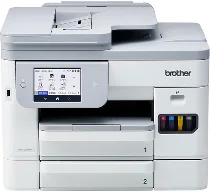
Brother MFC-J5115N Driver lets the computer recognize this all-in-one inkjet for print, scan, copy, and fax work. After installation, print commands can reach the machine instead of stopping at an unrecognized device. The same software keeps the scanner and fax functions available to the operating system. Jobs then follow the connection selected during setup, whether the printer is attached directly or used over a network.
Brother MFC-J5115N Drivers for Windows
fe61024de01d073a4f53e41676635bf09dea62c1fa75f4082112386db9fa6eb5aaf73007b2ce61e57400ca56a641f8fe75920cde0fc165fd2ac7d5e56891d6dead961ae8ccbdb8e08d4a9517539f76d4c058e86e354dcb8f4bee3d2c20ca9a92ad961ae8ccbdb8e08d4a9517539f76d4c058e86e354dcb8f4bee3d2c20ca9a92606365aa62d5a389838be3f9dc948ba20aa6bc034fd346347f1a11652519f10d21cbc8a02c4d8d0ee6158ac79f80d6e4aef41bcc98316f54a2341126e5a66dff86c576b4ba3923a1703996d04baaf9d5949d783d4ac830d7656776c3177480b60917273bb5bc10ee4775f36bd98bd05152835bf5370614cf5a803ffa9260b0adBrother MFC-J5115N Drivers for macOS
ab191c74c8480a0f4b1008b1785d18ce467cd80d205d1301c97c6e8e0b7095ddBrother MFC-J5115N Drivers for Linux
dc05d28392d3ff3e71919e17163a156e8212893849df26916505cb04b68abf139b64931feb4bc29622930ee73ffd329549d9df62f3a052ea7843373e8603b9939c3a200db3dc7b2b3332dff8c5226b4f3ee560d20b2e1f4918b1faf7124517b2197f63a52e89b8744f5a3c2d843abb3b76d003d5d4830bdfe675c44841a6c72bcda25534ea8e3018e7d46b970cb08b36084355adedc933aba0c8c7d03e903db901dc859f1978e645147ced5ec4b5448cc3e26b1c6d2f1104834f5891c0e17469d724746540a51f8286f2a318b47657227f7131d384a1a4f0475dacb7e3580f3ee74ef3a5529ebf3b26d6139ce15d75374a4538ba2efd48c28b209b0d705e5ec72ba3bffcf199fee6387cb79d6923214648db0f2df1c5a13f8f8f0a6fe0995c401404f2622e60470b4de25d0cdb4adc0f130ace6b380cc0d4b3d7714ad761c1aee28a8765f6637456d81ad1a56226e6857be2f1581fdcd9e4a5a4fbc4c42dd3450a4412b306b9ce2eb7e3ef4734a7b648f9561f525922b02541e98b545929dc2b82aa17ba2e331de1fcb34f0a839d27b9b193ac680d9742250a89e588a6bd56206c4e17c6dbcf263d9d08fb460ccd5b9f1a23fce79b30d0a41d96a224839322b2Brother MFC-J5115N Specifications
Brother MFC-J5115N is an A4 colour inkjet all-in-one for printing, scanning, copying, and faxing. Its piezo inkjet engine runs on four separate pigment ink cartridges from the LC516 and LC516XL series. A 4.3-inch TFT colour touchscreen handles local operation, while onboard memory is 512 MB. Physical measurements are about 435 x 439 x 340 mm, and the listed weight is about 17.1 kg.
Printing reaches up to 1200 x 4800 dpi. On A4, ISO speed is about 28 ipm in monochrome and 26 ipm in colour; first-page output takes 4.5 seconds for black and 4.7 seconds for colour. Automatic duplex printing works on A4, Letter, Legal, Executive, B5, A5, B6, and postcard media, while borderless output covers A4, Letter, A6, index cards, L-size photo paper, 2L, postcards, Legal, and 210 x 900 mm long paper.
Scanning uses the flatbed glass together with a 50-sheet automatic document feeder. Optical resolution reaches 1200 x 2400 dpi from the glass and 600 x 600 dpi from the ADF. The glass scans originals up to 213.9 x 295 mm, whereas the feeder reads up to 213.9 x 353.6 mm for normal documents. Software interpolation rises to 19200 x 19200 dpi. Duplex scanning is available through the ADF.
Paper input comes from two 250-sheet trays and a 100-sheet multipurpose tray for A4 plain paper. Tray 1 takes plain, coated, glossy, recycled, envelope, postcard, and photo media, while tray 2 takes only plain or recycled paper. Copying can produce up to 999 copies with 25 to 400 percent scaling. Faxing uses ITU-T Super Group 3 at 33.6 kbps. Connections include Hi-Speed USB 2.0, wired LAN, wireless LAN, and Wi-Fi Direct.
Technical Details
| Title | Brother MFC-J5115N Drivers |
|---|---|
| Device Type | All-in-one printer |
| Driver Version | Varies by driver and operating system |
| Available Downloads | Drivers |
| License | Free |
| Manufacturer | Brother Industries, Ltd. |