
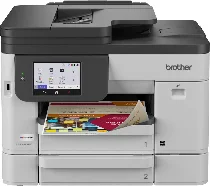
Brother MFC-J5110DW Driver enables the computer to communicate correctly with this wireless colour inkjet all-in-one. After installation, the system can recognise the machine for printing, scanning, copying, and faxing. Print and scan data can pass through either a wired or wireless connection. The driver also transfers the selected settings between the computer and printer.
Brother MFC-J5110DW Drivers for Windows
fe61024de01d073a4f53e41676635bf09dea62c1fa75f4082112386db9fa6eb5aaf73007b2ce61e57400ca56a641f8fe75920cde0fc165fd2ac7d5e56891d6dead961ae8ccbdb8e08d4a9517539f76d4c058e86e354dcb8f4bee3d2c20ca9a92ad961ae8ccbdb8e08d4a9517539f76d4c058e86e354dcb8f4bee3d2c20ca9a925571e29231994765911456e4a55ae5bffcd09e765b93b4a1e8cff44712ddcbc66eddedfff4131bc903d581f6dc86a8518e1c82980a4cd38b4396c4c1bb1338d35f3ad9dd0475f7524f0e489aa7076da168c228bcd22031394a53fad4b9a2573f0917273bb5bc10ee4775f36bd98bd05152835bf5370614cf5a803ffa9260b0adBrother MFC-J5110DW Drivers for macOS
ab191c74c8480a0f4b1008b1785d18ce467cd80d205d1301c97c6e8e0b7095ddBrother MFC-J5110DW Drivers for Linux
dc05d28392d3ff3e71919e17163a156e8212893849df26916505cb04b68abf139b64931feb4bc29622930ee73ffd329549d9df62f3a052ea7843373e8603b9939c3a200db3dc7b2b3332dff8c5226b4f3ee560d20b2e1f4918b1faf7124517b2197f63a52e89b8744f5a3c2d843abb3b76d003d5d4830bdfe675c44841a6c72bcda25534ea8e3018e7d46b970cb08b36084355adedc933aba0c8c7d03e903db901dc859f1978e645147ced5ec4b5448cc3e26b1c6d2f1104834f5891c0e17469d724746540a51f8286f2a318b47657227f7131d384a1a4f0475dacb7e3580f3ee74ef3a5529ebf3b26d6139ce15d75374a4538ba2efd48c28b209b0d705e5ec72ba3bffcf199fee6387cb79d6923214648db0f2df1c5a13f8f8f0a6fe0995c401404f2622e60470b4de25d0cdb4adc0f130ace6b380cc0d4b3d7714ad761c1aee28a8765f6637456d81ad1a56226e6857be2f1581fdcd9e4a5a4fbc4c42dd3450a4412b306b9ce2eb7e3ef4734a7b648f9561f525922b02541e98b545929dc2b82aa17ba2e331de1fcb34f0a839d27b9b193ac680d9742250a89e588a6bd56206c4e17c6dbcf263d9d08fb460ccd5b9f1a23fce79b30d0a41d96a224839322b2Brother MFC-J5110DW Specifications
The Brother MFC-J5110DW is a colour inkjet all-in-one built for printing, scanning, copying, and faxing. Its piezo printhead carries 420 black nozzles and 420 nozzles for each colour channel. A 4.3-inch, 10.9 cm TFT colour touchscreen works with 512 MB memory. Originals can use the scanner glass or 50-page ADF, which also reads two-sided originals in a single pass for scan, copy, and fax work.
Print resolution reaches up to 1200 x 4800 dpi, while maximum speed runs up to 28 ppm in black and 26 ppm in colour. Scanning reaches 1200 x 2400 dpi from the glass or 600 x 600 dpi from the ADF, with interpolation up to 19200 x 19200 dpi. Copying runs up to 24 ipm in black and 14 ipm in colour. Reduction and enlargement range from 25 to 400 percent.
Paper input is split between two 250-sheet trays, while the 100-sheet multipurpose tray accepts heavier media and envelopes directly. The cassette path takes Letter, Legal, Executive, A4, A5, A6, Folio, photo sizes, index cards, and several envelope formats. Finished pages collect in a 150-sheet output area. Automatic two-sided printing works with plain or recycled paper in Letter, Legal, Executive, Folio, A4, and A5 sizes.
Hi-Speed USB 2.0, Gigabit Ethernet, dual-band wireless networking, and Wi-Fi Direct cover the main connection paths. The front USB host prints from or scans to USB memory, while mobile printing works through AirPrint, Mopria, Brother Mobile Connect, and Wi-Fi Direct. Fax hardware runs through a 33.6 Kbps modem with duplex faxing. Closed measurements are 17.1 x 17.3 x 13.4 inches, and weight is approximately 37.7 lb.
Technical Details
| Title | Brother MFC-J5110DW Drivers |
|---|---|
| Device Type | All-in-one printer |
| Driver Version | Varies by driver and operating system |
| Available Downloads | Drivers |
| License | Free |
| Manufacturer | Brother Industries, Ltd. |