
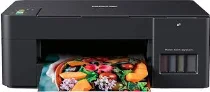
Brother DCP-T420W Driver helps the computer communicate correctly with this multifunction ink-tank printer during setup. Once the device is recognized, printing, scanning, and copying can work through the selected connection. Stable command transfer keeps each job matched with the chosen settings. After setup, documents and scanned files move between the computer and printer with proper device recognition.
Brother DCP-T420W Drivers for Windows
a78ee9caa737f486f4db01161157535c041c4002410284adbf6880a5a1d9fb7f461c16a926231325f9af311cf7f2db7731509aa718f28a6a5f94ee5a3252753c461c16a926231325f9af311cf7f2db7731509aa718f28a6a5f94ee5a3252753c0edce9170c3f46f065e52aa6335c093befa453212698a94c7d59fcfc5197fa7e620a6edb07eb3cc42101177454215a536ede7a369c6bf2ac76b88963d661307d71169ef33cab91b5dc1e848ff483c40ad2eec7be44e69fcb0c084a590a79b49eBrother DCP-T420W Drivers for macOS
b1a665cde46e191ff64b9ba12e9f4aad9967e69c210f5df07df6b880496dab54ac24dc9ef5043009b2f2646e04861883d81baeb6d1d13139b1686028b80f59c0Brother DCP-T420W Drivers for Linux
3ede819a65aec379ec7676f7ac0cacabd70879fbaaf2c7978eeae406c0e1c1f205bbfbd8bbb6677747a2d54524d70d3215c434b7e033ea34606fc57c0c45a9569c3a200db3dc7b2b3332dff8c5226b4f3ee560d20b2e1f4918b1faf7124517b2197f63a52e89b8744f5a3c2d843abb3b76d003d5d4830bdfe675c44841a6c72bcda25534ea8e3018e7d46b970cb08b36084355adedc933aba0c8c7d03e903db901dc859f1978e645147ced5ec4b5448cc3e26b1c6d2f1104834f5891c0e17469d724746540a51f8286f2a318b47657227f7131d384a1a4f0475dacb7e3580f3ee74ef3a5529ebf3b26d6139ce15d75374a4538ba2efd48c28b209b0d705e5ec72ba3bffcf199fee6387cb79d6923214648db0f2df1c5a13f8f8f0a6fe0995c401404f2622e60470b4de25d0cdb4adc0f130ace6b380cc0d4b3d7714ad761c1ae82aa17ba2e331de1fcb34f0a839d27b9b193ac680d9742250a89e588a6bd56206c4e17c6dbcf263d9d08fb460ccd5b9f1a23fce79b30d0a41d96a224839322b2Brother DCP-T420W Specifications
Brother DCP-T420W is an ink-tank multifunction inkjet for printing, scanning, and copying. Printing comes from a piezo print head, using 210 black nozzles and 70 nozzles for each colour channel. Inside the body, 64 MB of memory handles basic printer processing. Button controls and an LED display manage local operation instead of a touchscreen. Separate refill tanks hold black, cyan, magenta, and yellow ink.
From Windows, print resolution reaches up to 1200 × 6000 dpi with best mode and glossy media. A4 document printing runs up to 16.0 ipm in mono and 9.0 ipm in colour. Fast mode reaches 28 ppm for black output and 11 ppm for colour output. The flatbed scans at up to 1200 × 2400 dpi optical resolution. Copy reduction and enlargement run from 25% to 400%.
Paper feeds from a 150-sheet front tray. A one-sheet manual feed slot handles single envelopes or specialty media outside the main tray. Both feed paths take plain, inkjet, glossy, and recycled paper. Page sizes include A4, Letter, Legal, Folio, Executive, B5, A5, B6, and A6. Envelopes, photo sheets, and index cards also fit the paper path. A 50-sheet output area collects printed pages on 80 gsm plain paper. Borderless printing is limited to A4, Letter, A6, Photo, Photo L, Photo 2L, and index card sizes.
A nearby computer can connect through Hi-Speed USB 2.0. Wireless use runs through Wi-Fi infrastructure mode or Wireless Direct, with WPS available during setup. IEEE 802.11b/g/n carries network printing and scanning after the printer joins the wireless network. Wireless security uses WEP, WPA-PSK, or WPA2-PSK modes. With the trays closed, the body measures 435 mm wide, 359 mm deep, and 159 mm high. The listed weight is 6.4 kg. The printer uses about 11 W while copying, 2.5 W in ready mode, 0.7 W in sleep mode, and 0.2 W when switched off.
Technical Details
| Title | Brother DCP-T420W Drivers |
|---|---|
| Device Type | All-in-one printer |
| Driver Version | Varies by driver and operating system |
| Available Downloads | Drivers |
| License | Free |
| Manufacturer | Brother Industries, Ltd. |