
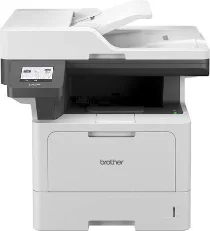
Brother DCP-L5660DN Driver helps the computer recognize this monochrome laser multifunction printer during setup. After installation, USB or network communication carries print, scan, and copy commands between the computer and the machine. Document settings stay tied to the active job instead of being sent as unmatched commands. Scanned files can return to the computer through the supported scan software, and print jobs can process with the selected driver settings.
Brother DCP-L5660DN Drivers for Windows
b70c0366dc0c8394b3655fe47271e28f3549acb3702f0d813c51fbf25f319291f13a9bd5c2a1619356eec76d2dfee8264722a2fc742ee4a69495740b4581a4a5f13a9bd5c2a1619356eec76d2dfee8264722a2fc742ee4a69495740b4581a4a5e03602d33d26952daa81cc8da4d5739ba571c6102073fc023b49aed3ad41cc446eddedfff4131bc903d581f6dc86a8518e1c82980a4cd38b4396c4c1bb1338d3ee2cabe92d46f7f6804a469fbdf46bfefbc58df649a126f936d83c3cc990a4efba40f5efe1d1d3896139bc31bc28b4a3f2e75c76684987239019db6a68d6977d5f3ad9dd0475f7524f0e489aa7076da168c228bcd22031394a53fad4b9a2573f71169ef33cab91b5dc1e848ff483c40ad2eec7be44e69fcb0c084a590a79b49eBrother DCP-L5660DN Drivers for macOS
3d47651cbaceb576a31d74893daf42a6049ccb331d85461ae5e6933f1410e05fBrother DCP-L5660DN Drivers for Linux
d13009e0d3f2535a1fd95f30a2fbc7e2d9570074ac5c5dbfbcf3ebeb48587b81fd5fdd90048275fb26d54040a8f19414a5459cf13f7fe701904ef1087f5d23189c3a200db3dc7b2b3332dff8c5226b4f3ee560d20b2e1f4918b1faf7124517b2197f63a52e89b8744f5a3c2d843abb3b76d003d5d4830bdfe675c44841a6c72bcda25534ea8e3018e7d46b970cb08b36084355adedc933aba0c8c7d03e903db901dc859f1978e645147ced5ec4b5448cc3e26b1c6d2f1104834f5891c0e17469d724746540a51f8286f2a318b47657227f7131d384a1a4f0475dacb7e3580f3ee74ef3a5529ebf3b26d6139ce15d75374a4538ba2efd48c28b209b0d705e5ec72ba3bffcf199fee6387cb79d6923214648db0f2df1c5a13f8f8f0a6fe0995c401404f2622e60470b4de25d0cdb4adc0f130ace6b380cc0d4b3d7714ad761c1ae82aa17ba2e331de1fcb34f0a839d27b9b193ac680d9742250a89e588a6bd56206c4e17c6dbcf263d9d08fb460ccd5b9f1a23fce79b30d0a41d96a224839322b2Brother DCP-L5660DN Specifications
Brother DCP-L5660DN is a monochrome laser multifunction centre for printing, scanning, and copying. The print engine runs up to 48 ppm on A4 paper and 50 ppm on Letter paper. From ready mode, the first printed page comes out in under 6.7 seconds. A Cortex-A53 dual-core processor handles the main processing with 2 GB of memory. Local control uses a 3.5-inch colour touchscreen. As a DCP model, the machine leaves out fax hardware.
Print resolution reaches up to 1200 × 1200 dpi. Automatic duplex printing works with plain, letterhead, coloured, thin, and recycled paper. Copying runs up to 48 cpm on A4 and 50 cpm on Letter, with copy output reaching 1200 × 600 dpi. Reduction and enlargement move from 25% to 400% in 1% steps. N-in-1 copying places multiple originals onto fewer printed sheets for compact document layouts.
Scanning uses a one-pass dual-CIS automatic document feeder and a flatbed glass. The flatbed handles single originals, while the 70-sheet ADF feeds multipage documents. Optical scan resolution reaches 1200 × 1200 dpi. On Windows, interpolation can reach 19200 × 19200 dpi. In simplex mode, the ADF scans up to 28 mono or 20 colour images per minute. Duplex scanning raises the rate to 56 mono or 40 colour images per minute.
Paper handling starts with a 250-sheet standard tray. The multipurpose tray accepts up to 100 sheets and can also take envelopes. Face-down output holds 150 sheets, and the straight face-up path handles one sheet. Optional LT-5505 or LT-6505 trays can raise total input capacity to 1,390 sheets. A nearby computer can connect through Hi-Speed USB 2.0. Wired network use runs through Gigabit Ethernet. The body measures 495 × 460 × 486 mm and weighs 15.5 kg.
Technical Details
| Title | Brother DCP-L5660DN Drivers |
|---|---|
| Device Type | All-in-one printer |
| Driver Version | Varies by driver and operating system |
| Available Downloads | Drivers |
| License | Free |
| Manufacturer | Brother Industries, Ltd. |