
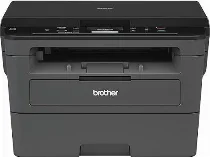
Brother DCP-L2510D Driver helps a computer identify this monochrome laser multifunction printer before sending print jobs through USB. After the USB connection is active, Windows can pass print commands to the machine instead of leaving it as an unknown device. Scanning also depends on the same device communication, because the flatbed must be detected before scan software can reach it. Copying works from the machine itself, but correct driver setup keeps print and scan tasks available from normal desktop use.
Brother DCP-L2510D Drivers for Windows
e05b53fbd01649079680df57d1480f3f8c2cdbfa2ac50e5e6f530eb4b768e0816722a890472e2cab4d5c8347e7f6d3b47aa1b0375cbb3179888873251b043bf06722a890472e2cab4d5c8347e7f6d3b47aa1b0375cbb3179888873251b043bf0a1eba9683e8b58e4686d7b8362f7297b80c9d454d051000da98ab810634f45d1Brother DCP-L2510D Drivers for macOS
e0c68c4dc939326de2735539c973e4f61ad2c147df5bb7b80127e7286875d486ac24dc9ef5043009b2f2646e04861883d81baeb6d1d13139b1686028b80f59c0Brother DCP-L2510D Drivers for Linux
dc567dbfd4b0b9a7d1bcd483b615b24e36eb5c4bc3004c3c57076a2b17c6732b1646199d53d1c78a5d9c7337f27e822ea54df59e8152ad8e8ff0bd2b5f28cb5f027b73648722ac8c8eb1a9c419d284a6562cc763feac9740a2b75a683b09297289d82315fd9d629f8af7b5bc489f392da218acfe2436e42eec147246101636d5cda25534ea8e3018e7d46b970cb08b36084355adedc933aba0c8c7d03e903db901dc859f1978e645147ced5ec4b5448cc3e26b1c6d2f1104834f5891c0e174694225e91dd7f7d0ba2a202f616b15b669be7800c271a7d25efed94191f71fc4500fec3bcffeb597b2d23ef7ff31f34dc7bd8d4736a35c2d1ff5e56784d709ce532ba3bffcf199fee6387cb79d6923214648db0f2df1c5a13f8f8f0a6fe0995c401404f2622e60470b4de25d0cdb4adc0f130ace6b380cc0d4b3d7714ad761c1ae82aa17ba2e331de1fcb34f0a839d27b9b193ac680d9742250a89e588a6bd56206c4e17c6dbcf263d9d08fb460ccd5b9f1a23fce79b30d0a41d96a224839322b2Brother DCP-L2510D Specifications
The Brother DCP-L2510D is a monochrome laser multifunction printer for print, scan, and copy work. Its print engine uses electrophotographic laser technology and 64 MB of memory. Local controls sit beside a 16-character, two-line LCD. Scanning relies on the flatbed, so each original has to go on the glass by hand. This DCP model does not carry fax hardware like Brother MFC units.
Print quality starts at 600 x 600 dpi, with HQ1200 giving Brother’s 2400 x 600 dpi equivalent output. Brother gives the highest print resolution as 1200 x 1200 dpi. On A4 paper, the machine prints up to 30 pages per minute. From ready mode, the first page comes out in less than 8.5 seconds. Automatic duplex printing runs through the print path. The scanner glass records up to 1200 x 1200 dpi optically, and copy resolution reaches 600 x 600 dpi.
Paper feeds mainly from a 250-sheet cassette. That cassette takes plain, thin, recycled, or thick paper in common sizes up to A4 and Letter. A single-sheet manual slot handles heavier one-off media, including bond paper, labels, and envelopes. For envelopes, Brother names COM-10, DL, C5, and Monarch. Finished pages leave through a 120-sheet face-down output tray. Without an automatic document feeder, the flatbed accepts one original at a time up to 215.9 x 300 mm.
A wired computer connection uses Hi-Speed USB 2.0. Brother specifies a USB cable no longer than 2.0 metres. Ethernet, wireless LAN, Wi-Fi Direct, and NFC apply to other machines in the same support table, not this exact DCP-L2510D configuration. With the trays closed, the body measures 410 mm wide, 398.5 mm deep, and 272 mm high. The unit weighs 10.3 kg with supplies installed. Deep sleep power use falls to about 0.6 W.
Technical Details
| Title | Brother DCP-L2510D Drivers |
|---|---|
| Device Type | All-in-one printer |
| Driver Version | Varies by driver and operating system |
| Available Downloads | Drivers |
| License | Free |
| Manufacturer | Brother Industries, Ltd. |