
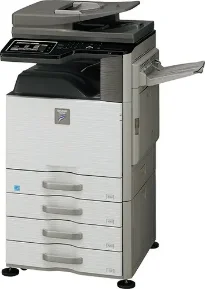
Sharp MX-M464N’s enhanced multifunctional capabilities allow tomorrow’s document needs to be met today. It is a large workgroup machine designed with a standard 100-sheet reversing single-pass feeder and a 500 + 2000-sheet tandem paper drawer that helps expand the maximum online paper capacity to 6600 sheets. Its flexible paper handling system feeds up to 80 lb. Cover through the paper trays and up to 110 lb. Cover through the bypass tray. The monochrome copier uses a 7ʺ color touch-screen display with intuitive menu navigation and a full-size retractable keyboard that allows for quick and easy data entry.
Sharp MX-M464N Drivers for Windows
b75f1cf27114c51f3afdf0ff0336c4920c9e1fc39ba8be9fd51b107001e68fc077b66f821665aa991aaf34ca8f7f8fdb9ac8d68b0228f2f359e45350bab9572e394e7b9835cb5a45d253b34654c5aceb630bf3b33561d8874746557e067c034bcf6d4f3cd1fdad715fed040fb261100ee2ece06d43bda3cae60aa55ef13167ddbfe70b61ddd4fe657e18365dddd1eb98e3a7ac90ae01ab148a035fb610b7e404ebbf5e11c809479d1476466001a6f71ba83a61fa51ae4013b6aa70145554e9f055d353acb2b9c75fcbe7753baf7aa4203bdec983f5ac73567a3fa5253cd1597220103a0b35e9f5da4294fa19712ac7a627c41ccc5af4905b522a9143196de37aSharp MX-M464N Drivers for macOS
7bab21a4563dbffe5f5966c15465a28ee8b83cb6ef4e864fd8d17e5bdccc9cdbSharp MX-M464N Drivers for Linux
b9b2c356b9fef4375a678e09446f04e6dfce35a5ac004f6e2fb1bf1701470af7Sharp MX-M464N Specifications
The copier has 320GB hard disk storage and uses a shared 3GB of RAM. The copier’s 600 x 600 dpi printing resolution provides clear, crisp images on all jobs. Printing up to 46 pages per minute with a first copy time of 3.9 seconds, the copier can make up to 999 continuous copies. The Sharp MX-M464N works in both monochrome and grayscale copy modes and has an output of 600 x 600 dpi. Compact and energy efficient, this monochrome machine has a warm-up time of 12 seconds or less.
It uses a network ready PCL 6 printing system and available optional PostScript 3 emulation with 80 PCL outline fonts and 136 PS fonts. The network printer supports direct printing for TIFF, TXT, PDF (encrypted), PCL, JPEG, PostScript, and XPS through Sharpdesk mobile, FTP, SMB, webpage, e-mail, and USB. It is Windows and Mac compatible and uses an RJ-45 Ethernet 10/100/1000 Base-T and USB 2.0 interface.
The scanner scans in color, monochrome or grayscale mode and displays output in 600, 400, 300, 300 or 100 dpi resolution modes. Scan destinations include e-mail, desktop, FTP, folder USB, internet fax and 995 more. Supports Sharp’s enhanced security platform with standard 256-bit data encryption, up to 7 times overwrite protection, and convenient end-of-lease feature.
Technical Details
| Title | Sharp MX-M464N Drivers |
|---|---|
| Device Type | All-in-one printer |
| Driver Version | Varies by driver and operating system |
| Available Downloads | Drivers |
| License | Free |
| Manufacturer | Sharp Corporation |