
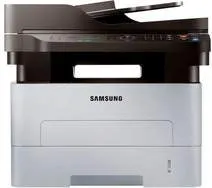
The Samsung Xpress SL-M2870 printer model uses laser print technology to produce top quality outputs in black and white. At the same time, it has a liquid crystal display (LCD) screen with two lines to show the printer’s status. Also, the machine produces 12000 impressions as its maximum duty cycle in a month. Then, it has an internal memory of 128 MB of RAM for adequate job processing. This machine has a single black cartridge that can print up to 1200 pages in its capacity.
Samsung Xpress SL-M2870 Driver for Windows
Driver and Software for Mac OS
Driver for Linux
Specifications
In terms of the power usage in the printer cartridge, the sleep mode requires 0.9 watts. Whereas, when the printer is at standby mode, ready for printing, it runs on 45 watts of power. But when it is at full operation, the maximum power usage is up to 400 watts. As a multifunction printer, the machine is also capable of not only printing but even copying and scanning. Therefore, at its copying mode, the average speed is up to 29 pages per minute (ppm).
Besides, the copy resolution is up to 600×600 dots per inch (dpi), but the first copy page comes out in 8.5 seconds. Other exciting applications of the copy feature include 2-up, 4-up, ID card copy, and poster copy. The machine also has EPEAT compliance as well as ENERGY STAR certification. During printing, the maximum resolution of the device is up to 4800 x 600 dpi and speed of 29 ppm. In terms of the printer driver, the drivers or emulation options include PCL 5e, PCL6, and Samsung Printer Language (SPL).
There is an automatic duplex printing for working on both sides of the page by itself at the best productivity. Also, according to the necessary standards, this machine produces a sound emission level of 26 dBA (idle) or 50 dBA (operating). Download Samsung Xpress SL-M2870 driver from HP website