
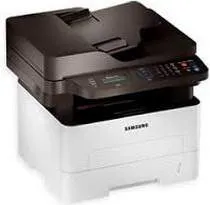
The Samsung Xpress SL-M2676 model of printer belongs to the multifunction class of Samsung printers with laser print technology. Therefore, the machine can print, copy, scan, send, or receive fax messages with excellence. In terms of the physical measurements, the device has a width of 15.8 inches and a depth of 14.3 inches. Besides, the height is up to 14.4 inches while the weight is up to 24.47 lbs. When the printer is in the shipping package, the gross weight is up to 30.31 lbs.
Samsung Xpress SL-M2676 Drivers for Windows
dc487832351c04d49d4fe41f5bef9c6ead1bb5054d3092c1f72b23a99d307bace32f7e01f04b70c74344bf2968545bf318d728a333571202c0a7a1966d3fd355ed7ba3cf15ba39158ef28454606db7ce1832cbe8bc059d2fca60a03bf1e65de5b96c4669b99267f6321f58c4ee0a6937ad6c3f624140f5e65fef551d8e448be5Samsung Xpress SL-M2676 Drivers for macOS
e9ce51d39f7213706576e7c849700138a5766a933a2b6e5629f2d3b5a1ca9000aa091be591f0a958b4588eba72153636941c0a4d519d8f849eb8c3770549c824bc18583816cd150a2ae02c30876bc4aa9f333848c5184d9767d319cc189b4b116f61cc8dd0c6959ddba08fb40c222316298a119e7ec68ad34c5f8656791bd2a569256b8b2ec0d835623a311556569e79bd002b504d1ad679d3db301362357d43Samsung Xpress SL-M2676 Drivers for Linux
0c38213b846644500526bf281caaa6e36c40b8f2241cac2f0398c97c3814540eSamsung Xpress SL-M2676 Specifications
While scanning, the optical resolution is up to 1200 dots per inch (dpi) at the maximum resolution. Also, the grayscale depth is 8-bit while the color depth is up to 24-bit using the CIS scan element. In the faxing mode, the maximum transmission speed is up to 33.6 kbps, with the A4 size being compatible. The machine software includes the PC fax utility, Samsung Easy Document Creator, Samsung Easy Printer Manager, and driver and services.
The office machine features of the Samsung Xpress SL-M2676 model include the scan to folder and scan to PC options. Also, it involves a 10-key numeric keypad on the control panel that shows two lines of the display. This machine can print up to 12000 pages in a month, according to the duty cycle. However, the manufacturer recommends that users should keep the production between 250 and 2000 pages. The fax type of paper is the plain paper as the appropriate compatible size.
The mobile printing capabilities include Apple AirPrint, Google Cloud Print, and Mopria Print Service and other appropriate features. In terms of the standard internal memory, the maximum size is up to 128 MB of RAM. The power consumption of the machine depends on the status of the printer. For instance, the sleep mode is only about 1.1 watts, while the standby mode takes only 50 watts.
Technical Details
| Title | Samsung Xpress SL-M2676 Drivers |
|---|---|
| Device Type | All-in-one printer |
| Driver Version | Varies by driver and operating system |
| Available Downloads | Drivers |
| License | Free |