
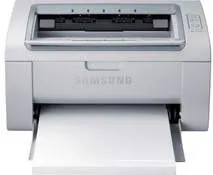
The Samsung ML-2160 printer is the first member of the ML-2160 Samsung printer series. By physical measurements of its sides, it has a width of 13.07 inches and a depth of 8.46 inches. However, the height reaches about 7.01 inches, while the weight is up to 10.91 lbs. The equivalent weight is about 4.95 kg. It produces noise according to the current mode. For instance, when in the active mode, the noise level is below 26 dB (A). But when in the printing mode, the noise level reaches 50 dB (A).
Samsung ML-2160 Drivers for Windows
e4256eca5151a5c923b75e781c763b961f6230ab465a23999eeb417bd58ee27f2c73bb53d0a9c33387a4e7beacd364aa3278823363c01395485285e693de29cc67be1c636816931761950bbd82ec011bf2baceba46462120d8e18167ffe1fed3Samsung ML-2160 Drivers for macOS
4ea9b87fc3e2aff93fc2e67143ba2a96dc34c9018009fbdd953a7078c241439eSamsung ML-2160 Drivers for Linux
0c38213b846644500526bf281caaa6e36c40b8f2241cac2f0398c97c3814540eSamsung ML-2160 Specifications
Similarly, before this printer can yield productively and at optimum performance, certain environmental factors must be in place. For example, during operation, the acceptable temperature range is between 10 and 32°C. In contrast, when the machine is in storage, the temperature range is between -20 and 40°C. Also, relative humidity should remain between 10 and 80% without condensation, when in operation. And the packed printer can be in an environment with RH of 20 to 95% without condensation.
There are two classic model groups in this family: the 110-volt models and the 220-volt models. The former allows a power range between 110 and 127 volts, and the latter permits 220 to 240 volts. However, the power consumption of the Samsung ML-2160 machine mainly depends on the current processes in it. For instance, the normal operating mode consumes less than 310 watts of power, while the effective method uses 30 watts. Furthermore, the power save mode uses less than 0.9 watts, while the power off mode requires 0.45 watts.
The sound pressure and the power ratings are in accordance with the ISO 7779 printer standard. Also, it has a tested configuration with necessary machine installation and paper compatibility. More details on the machine properties are available on the label, which contains the correct voltage and frequency.
Technical Details
| Title | Samsung ML-2160 Drivers |
|---|---|
| Device Type | Printer |
| Driver Version | Varies by driver and operating system |
| Available Downloads | Drivers |
| License | Free |
| Manufacturer | Samsung Electronics Co., Ltd. |