
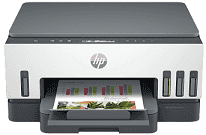
HP Smart Tank 7000 Driver links the computer to the printer so the operating system can identify its print and scan hardware. Once installed, the software sends print jobs to the ink-tank print engine and receives images from the flatbed scanner. Copying remains a local printer function, although the driver keeps the print and scan settings available on the computer. Without the correct software, the system may detect the USB or wireless connection without fully exposing those functions.
HP Smart Tank 7000 Drivers for Windows
0c540ec7738d512ed06d241f98f85bbdaf57add335e88fd495d5dff93f91cf4e620068045902345004931235f980d18321eb73b2b9e83672a905b17b6e823677b43e074dd8d4aa3f8bfd43bcf90e6fe132b6dacd28543d9c29bf70cc6d06c67733a48d17157441a5f626bf8b2b5f85c04c1a524bacff1c548f899ad90978765ec11fe40d2b794ffeb0c9f87b6f22efe7b178646c583b58276f0dc4b24872778a49aee77d43d920b362885f4bdc240b68dca11ed11c603fd326dea9ecef33110b4e19a78f0f7887e81a3c71b6bafd43b4a6cc10bf39228f932118cff6b9a06b7983d239d64aa753b224ac1a5c229527fba7a264eb3653fb95af54a387b27b3b1b83d239d64aa753b224ac1a5c229527fba7a264eb3653fb95af54a387b27b3b1bHP Smart Tank 7000 Specifications
HP Smart Tank 7000 is a colour all-in-one inkjet for printing, scanning, and copying. It has no fax hardware, and the scanner does not have an automatic document feeder. Printing comes from an HP Thermal Inkjet printhead supplied by four refillable tanks. Separate bottles hold black, cyan, magenta, and yellow ink. A CIS flatbed sits above the print engine, so each original must lie directly on the glass. The control panel uses a two-line LCD and guided buttons rather than a touchscreen.
ISO document speeds reach up to 15 ppm in black and 9 ppm in colour. Black output can reach 1200 x 1200 rendered dpi. For colour pages, the highest optimized setting is 4800 x 1200 dpi when the computer supplies 1200 dpi input. The flatbed scans at up to 1200 x 1200 dpi. Automatic duplex printing is built into the paper path, although two-sided originals still require manual repositioning on the scanner glass. Borderless printing reaches Letter or A4 size where the selected paper and settings permit it.
A 250-sheet tray supplies the printer, and the output area holds up to 100 sheets. That difference means a full input load may need attention before every printed page has been collected. Office paper can range from A6 to A4, with Letter and Legal sizes also accepted. The same feed takes envelopes and cards. Photo sheets use it as well, rather than a separate photo tray. Multi-page originals must be scanned one at a time because no document feeder is fitted, though the copier can produce several copies from each page placed on the glass.
A nearby computer can connect through Hi-Speed USB 2.0. Wireless jobs can travel over a 2.4 GHz or 5 GHz network, and Wi-Fi Direct provides a link when the home router is unavailable. Phones and tablets can send pages through AirPrint or Mopria. HP Print Service Plugin and the HP app provide further mobile access on compatible devices. HP rates the monthly duty cycle at up to 5,000 pages, but recommends a regular volume of 400 to 800 pages. With the trays closed, the body measures about 42.8 x 36.4 x 19.9 cm and weighs approximately 6.38 kg.
Technical Details
| Title | HP Smart Tank 7000 Drivers |
|---|---|
| Device Type | All-in-one printer |
| Driver Version | Varies by driver and operating system |
| Available Downloads | Drivers |
| License | Free |
| Manufacturer | HP Inc. |