
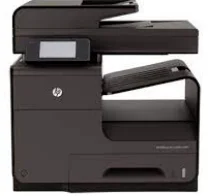
HP Officejet Pro X476dw is the multifunction printer that slots into any small-scale or medium-scale business. This fantastic machine is packed with an array of intelligent features and has a 10 cm touch LCD screen which enhances the printing experience. This Officejet printer from HP is based on Inkjet technology which competes with laser technology head to head. This printer is smaller, lighter, quieter, and produces much less heat as compared to a laser printer. When we talk about the solid overview of this printer, it is predominantly dark gray in color with a panel that covers the whole area from top to the left downside. At the upper part of the printer, you will find a 50-sheet automatic document feeder and a 300-sheet output tray.
HP Officejet Pro X476dw MFP Drivers for Windows
e7b583df49490220be14ac5ca067162b1ab0aafe406c0b7f53555806ebadddf18dbf47c3ead8aac9003e5ef2309c5ed8225c57338d8bf68205bc83fe3d6b9251dad61515848e21ec5f7591164c493e0fc15985ebe035a39ea9d295cedeb700ecd2f18088da8df16f0017983756626431eeeeddb0e386dd19a223c89e5a6a9c4fce728403422ec1c590fb971561abec94e476484815326373058a39afd61bccc2e2a9a96fe5fd24d2cbc8868efaa9de956f88983424e4abe9222281383765316665600b3146322a625534e02a701fc04e05403b71f61f358d6358f868ffc1c676eb727293767ac87183406c24c35cea7756c5b4acbcd130e968e6f166c6c95c08bea1ab4fb7079681cb60e7dcc19ffdcaa8f955a7b4c018f4b44c5ff05cf20973b5e03eff7772b8ff14e6bc09e7d3ece79fdc058ac93e597d4de58ea65cd131a1680967e8c32026bc2071ce27a65e55a2e26501f405a8a09c0324f59a974f1cc2252e3bb84737038c907650b13a150fe34cfaddc5810fa8a17e29b0e1e3e49fed9086a918c0d2b80dc034ad79fe64f90fc0fb244fb9ed7af2c3c9e71cf03979831088425bc237bfabaf7ff8fedb6675d2bc6a55836caa899688eda82c404247313e1529cc2cf7f249d20d574f41e6d32f7e9ce1341e11553bec91c6fa19a34663HP Officejet Pro X476dw MFP Drivers for macOS
99e1d18847c64a405486ae34424f0a1c8d89920d17df86c45b6b0007f101d70a0fd484c37f10deff7b056850090e72f18ce94ed89f8b724ffaf2999672b3f115HP Officejet Pro X476dw MFP Officejet Pro X476dw Multifunction Printer Cartridges
HP 970 intro Black Ink Cartridge (~3000 pages), HP 971 intro cyan Ink Cartridge (~2500 pages), HP 971 intro yellow Ink Cartridge (~2500 pages), HP 971 intro magenta Ink Cartridge (~2500 pages)
The technology used in this HP Officejet Pro X476dw printer is not the same as that used in other standard inkjet printers. This printer can print up to 55 black and white document pages per minute. While printing a color document, it will also print 55 pages per minute. It prints at a black and white resolution of 2400 x 1200 dots per inch. It uses four cartridges, one each of cyan, magenta, yellow, and black. Using this printer, you can produce up to 50,000 pages per month without any quality problem. You can print on any media types such as paper cards, glossy photo, matte photo, envelope, recycled paper, and many others.
As we know it is a multifunction printer, you will find a copier, scanner, fax, and ADF to take a print on both sides of the page. This printer can hold up to a maximum of 1050 sheets and 300 sheets in the output tray.
This HP Officejet Pro X476dw printer is compatible with Windows Vista, XP, 7, 8, 8.1, and Windows 10. A 64-bit PCL6 Universal Print Driver is available for Windows 11. In the case of Mac, you can use this on Mac devices which are running on the Mac version 10 or higher.
HP Officejet Pro X476dw is the perfect printer if you are seeking a durable and fast printer. This printer is a fantastic printer which can perform operations in a few shots. The performance of this printer is mind-blowing as compared to its counterparts. If you still have any suggestion or query in mind, then feel free to contact us.
Technical Details
| Title | HP Officejet Pro X476dw MFP Drivers |
|---|---|
| Device Type | All-in-one printer |
| Driver Version | Varies by driver and operating system |
| Available Downloads | Drivers |
| License | Free |
| Manufacturer | HP Inc. |