
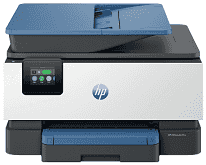
The HP OfficeJet Pro 9125 Driver gives the computer the software link needed to communicate with this color all-in-one printer. Print, scan, copy, and fax commands then reach the correct part of the machine instead of relying on basic device detection alone. The same driver communication matters whether the printer is connected by cable or over the network. Once setup is complete, document settings and scan data can pass between the computer and printer correctly.
HP OfficeJet Pro 9125 Drivers for Windows
c0d160ca0df6212bb1213bea0b07f3fff0cd76e044d6fe879d71d307e3d4e4b4620068045902345004931235f980d18321eb73b2b9e83672a905b17b6e82367733a48d17157441a5f626bf8b2b5f85c04c1a524bacff1c548f899ad90978765ec11fe40d2b794ffeb0c9f87b6f22efe7b178646c583b58276f0dc4b24872778a3c6881a3b77ba0e7042f41e647f27001481724678f084959e9f78d3958ab895e83d239d64aa753b224ac1a5c229527fba7a264eb3653fb95af54a387b27b3b1bHP OfficeJet Pro 9125 Specifications
The HP OfficeJet Pro 9125 uses HP Thermal Inkjet hardware for color printing and also scans, copies, and faxes. Four separate HP 936 cartridges supply the ink, so each color has its own replaceable cartridge. Menus and job settings appear on a 2.7-inch capacitive color touchscreen. Inside, the printer has 512 MB of memory for its operating tasks.
ISO print speed reaches 22 pages per minute in black and 18 pages per minute in color. The faster General Office setting can reach 32 ppm, and a black first page may come out in about 10 seconds. Automatic duplexing turns the paper for two-sided print jobs. Scanning reaches 1200 x 1200 dpi, and the 35-sheet document feeder can read both sides of an original using a dual-pass mechanism.
The main paper tray holds 250 sheets, compared with 60 sheets in the output tray. That smaller output capacity means a long unattended job may need the finished stack cleared before the input tray empties. Letter, Legal, Executive, and Statement paper fit the feed, as do smaller photo sheets and cards. Envelopes are accepted too, with room for up to 30. Borderless printing is limited to photo paper and reaches Letter or A4 size.
Ethernet gives the printer a wired network connection, and USB can link it directly to a nearby computer. For wireless jobs, dual-band 802.11 a/b/g/n/ac Wi-Fi connects through the network; Wi-Fi Direct can be used without the home router. AirPrint, Mopria, and the HP app provide additional routes from phones and other compatible devices. The printer is rated for as many as 25,000 pages in a month, but HP places its recommended monthly volume at up to 1,500 pages.
Technical Details
| Title | HP OfficeJet Pro 9125 Drivers |
|---|---|
| Device Type | All-in-one printer |
| Driver Version | Varies by driver and operating system |
| Available Downloads | Drivers |
| License | Free |
| Manufacturer | HP Inc. |