
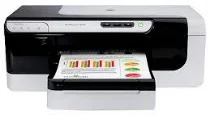
Regarding physical dimensions, this printer is unique with a height of 7.1 inches, a depth of 18.9 inches and a width of 19.5 inches. With the presence of a duplexer, the height of the tray measures and an additional 2.6 inches while the printer weight also slightly increases to 17.2 lbs. Also, when the supplementary tray (2) is present, the weight increases by 5.7 lbs.
HP Officejet Pro 8000 Enterprise Drivers for Windows
59893f6ded70184a67dd9936505d7ddde3f1b4c669874af9ed8ba8bb8af7ed5d947780a416409621e0c4d98106c9352e43d9e9bc5354bfe491fd3124c1799a11df30b9bd1a7b76c7f8f382119ecd68a76834903addce7bec1984a7db7ecadf0bce728403422ec1c590fb971561abec94e476484815326373058a39afd61bccc2d2f18088da8df16f0017983756626431eeeeddb0e386dd19a223c89e5a6a9c4fHP Officejet Pro 8000 Enterprise Drivers for macOS
0a8609067d72cfa008c5d5f0eb2136fd03b29399424f60659bb121d5c101fe9748cff8f62cabe6937dab16cfb2defca6adb621e526aa7b03a43c04a90c4d67ae6992c4c3b7f6f3ddd382f9f63c501256d8a101f938216faefc98027cc36c2b3beece6197645f82ec34984f8817d67efd91b7d6832237d778ce2ae18ac9997b74HP Officejet Pro 8000 Enterprise specifications
The connectivity options of this printer are a standard USB high speed 2.0 compliant port and a wired LAN network. There are four different cartridges in this printer, one each for black, yellow, cyan and magenta. However, not all of these cartridges match the requirements for each region where the printers are in use.
The recommended printer languages include the HP PCL 5e, PostScript 3 emulation and the PCL 6. The printer also supports HP 80 fonts which provide for the 45 scalable True type fonts and 35 builds in postscript. The monthly work cycle of this printer is about 15000 printed pages per month.
The printer has an inbuilt processor of 360 MHz ARM4, ETM (16-bit) and memories of 256 MB of RAM and 16 MB of Flash ROM.
An automatic duplexer is also present in this particular device, and this component helps it to print on the two sides of the page automatically. Supported media sizes include US Letter, legal, Executive, Statement, A4, A5, B5, B6, and custom-sized papers.
The main tray in this device and the supplementary tray (2) each hold up to 250 sheets of plain paper. However, the output tray has a capacity for 150 sheets of printed documents. The printer supports the use of envelopes, transparent films, labels, index cards, and photo media. Whether you are printing black or in color, the resolution this printer produces is only up to 600 dots per inch (dpi).
Technical Details
| Title | HP Officejet Pro 8000 Enterprise Drivers |
|---|---|
| Device Type | Printer |
| Driver Version | Varies by driver and operating system |
| Available Downloads | Drivers |
| License | Free |
| Manufacturer | HP Inc. |