
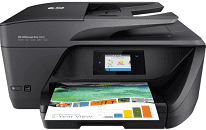
This HP Officejet product, as the name sounds, is most suitable for most offices, and as a multifunction printer, it fits the use better. The device is very easily capable of printing, copying, scanning, sending and receiving fax messages.
HP OfficeJet Pro 6960 Drivers for Windows
34a65e94e74b088784bd497e62d46031029ab39312e083df27e62d8322a3d1af8572400378f3d7b072210fd24d30df15bf466d4e03cf2be1aa5ff64a8ef937ee6f42583825e2b5cea4517a396cf2cf708c6ffb4b410b0364299eaf5fbd9465c4d2f18088da8df16f0017983756626431eeeeddb0e386dd19a223c89e5a6a9c4fce728403422ec1c590fb971561abec94e476484815326373058a39afd61bccc2cc5c7d9a9f83c8f0133c25117e3ec2eddb63bb42f93ef455246cb578202c6e93a4d5272029ec44a3a3eb879d14232d2852c06fe1ee19e3b9486c3d491245fc57a4d5272029ec44a3a3eb879d14232d2852c06fe1ee19e3b9486c3d491245fc57a4d5272029ec44a3a3eb879d14232d2852c06fe1ee19e3b9486c3d491245fc57HP OfficeJet Pro 6960 Drivers for macOS
99e1d18847c64a405486ae34424f0a1c8d89920d17df86c45b6b0007f101d70aThe model belongs to the HP OfficeJet Pro 6900 all-in-one printer series. Other members of that same series include the HP OfficeJet 6962, OfficeJet Pro 6968, OfficeJet Pro 6970, 6974, 6975 and 6978. The printer’s unique identification numbers for the HP OfficeJet Pro 6960 all-in-one printer are J7K33A, T0F30A, and T0F32A.
The HP OfficeJet Pro 6960 Driver connectivity options include the Ethernet LAN of 10/100 Base-TX, and Wireless component of 802.11b/g/n for 2.4 GHz networks only. Others include the standard hi-speed USB 2.0 ports (only at the rear), and WiFi Direct device. Users should note that this printer has no Near Field Communication (NFC) feature.
Another fascinating feature of this printer is its compatibility with Mobile printing solutions. As a result, the printer users can make use of software such as HP ePrint, HP Smart app, and the HP ePrint mobile app. Others include the HP Print Service Plugin (on Android), Apple AirPrint and Mopria certification.
Furthermore, the printer supports web service offerings such as the HP Instant Ink, HP ePrint web service and HP Print Apps. The other external parts of the printer include the automatic document feeder (ADF) with its guides and tray. Other parts are the scanner lid, scanner glass, power button, control panel display, paper width guides, input and output trays.
On the rear part of the printer are the power connection port, the two fax ports, Ethernet network port, and the rear USB port. The physical scopes of the HP OfficeJet Pro 6960 printer include a height of 9.0 inches, a width of 18.26 inches, a depth of 15.35 inches and a weight of 17.7 lbs.
Technical Details
| Title | HP OfficeJet Pro 6960 Drivers |
|---|---|
| Device Type | All-in-one printer |
| Driver Version | Varies by driver and operating system |
| Available Downloads | Drivers |
| License | Free |
| Manufacturer | HP Inc. |