
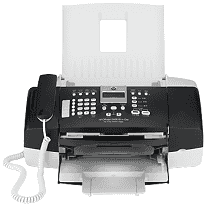
The printer is very much adaptable to the Office setting with a height, width and depth of 13 x 16.4 x 8 inches respectively. The weight of the printer is only 12 lbs.
The print mechanism uses a drop-on-demand Thermal Inkjet technology with the Lightweight Device Interface Language (LIDIL). The print resolution on this printer is 1200 x 1200 dpi black with a pigmented Black Ink and 4800 optimized dpi color. The color resolution has HP enhanced photo quality with Vivera inks on HP Premium Plus Photo papers. The monthly duty cycle of this product is up to 1000 pages.
HP Officejet J3680 Drivers for Windows
bead5a865dccb3487e370e1967840bbc8d1c6a725579d7457431ff74f5b8c0e716171382b2f8ac2a541a87bff727d275aad80a82a9f6f2b3e2d019f8f53c29ac248fb90e157856f7916c4c190a46b7be7c35a65aef92af1f2ab44a242be755e4HP Officejet J3680 Drivers for macOS
50702cffd8c77ef78beb9aef24d959abb3269a00093e241a2ec879c45e8c557858a0f8327c4920654cbdb8e4a6f828f1840c98a24991cb6556831aaaace3593fHP Officejet J3680 cartridges
HP 21 Black Inkjet Print Cartridge (~190 pages), HP 22 Tri-color Original Ink Cartridge (~165 pages)
The supported Windows operating systems for this HP Officejet J3680 include Windows 2000, Windows XP (32-bit and 64-bit, Professional and Home editions) as well as Windows Vista. Please note at this point that this printer manufacturer offers limited support for devices running on Windows 2000. However, the minimum requirements are stated thus:
1. An Intel Pentium II or Celeron processor, even though Pentium III or higher processor is recommended
2. 128 MB of RAM but 200 MB of RAM recommended
3. A free hard disk space of 100 MB
For Windows XP, the minimum processor is an Intel Pentium II or Celeron while an Intel Pentium III or higher is recommended. The minimum RAM size should be 128 MB although 256 MB of RAM is recommended. The minimum hard disk space should be 200 MB while 250 MB of space is recommended.
For systems running on Windows Vista, the minimum processor should have a capacity for 800 MHz on 32-bit or 64-bit. But the recommended processor should have 1 GHz on 32-bit or 64-bit. The minimum RAM size should be 512 MB, but 1 GB RAM is recommended. The free disk space available before running the printer should not be less than 174 MB with a recommended size of 250 MB.
HP Officejet J3680 driver Macintosh Operating Systems
The supported versions include Mac OS X v10.3.8, v10.4.6 and higher versions. However, these versions must have a minimum 400 MHz Power PC G3 processor in versions 10.3.8, 10.4.6 and higher versions. But in version 10.4.6, a 1.83 GHz processor is strongly recommended. The RAM size should not be less than 256 MB. The free hard disk space on the device connected to the printer should be at least 500 MB while an 800 MB space is recommended.
Copy specifications
The copy function uses digital Image processing to produce up to 99 copies from the original. The zoom range is between 25% and 400% of the size of the original document. The copy features also include a fit to page option and a pre-scan option. The copy speeds are mostly dependent on the complexity of the material being copied as well as the capability of the PC used. The maximum copy resolution is 600 x 1200 dpi and the minimum is 300 x 300 dpi.
Scan specifications
The scan function includes an image editor, as well as integrated OCR software that converts scanned texts to editable texts. The scan speeds vary according to the complexity of the document scanned. Another feature on the scan option is the TWAIN and WIA compliance. The maximum resolution for scanning is 1200 x 1200 dpi optical and in the enhanced mode, the resolution can be up to 19,200 dpi. The color depth for the scanning is 16 bits per RGB making a total of 48 bits.
Fax specifications
The fax function is based on walk-up black and white as well as color fax capability. The fax option takes up to 100 speed dials and has a storage memory of up to 200 pages based on the ITU-T Test Image at standard resolution. Please note at this point that larger or more complicated pages with higher resolutions take more time and more memory. The sending and receiving of the fax are strictly manual. There is also the automatic busy redial up to five different times. The transmission speed is 33.6 kbps.
Technical Details
| Title | HP Officejet J3680 Drivers |
|---|---|
| Device Type | All-in-one printer |
| Driver Version | Varies by driver and operating system |
| Available Downloads | Drivers |
| License | Free |
| Manufacturer | HP Inc. |