
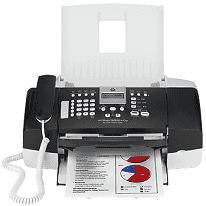
The HP Officejet J3608 is very compact and also has the advanced feature of faxing. From this printer, you can perform functions like scanning, printing, copying, and faxing, and it is also a phone. This printer will offer you the printing speed of 20 pages per minute for black and 14 pages per minute for color. It also provides you with the full faxing feature for color documents and the scanning features of up to 1200 dots per inch with a document feeder.
HP Officejet J3608 Drivers for Windows
bead5a865dccb3487e370e1967840bbc8d1c6a725579d7457431ff74f5b8c0e716171382b2f8ac2a541a87bff727d275aad80a82a9f6f2b3e2d019f8f53c29ac248fb90e157856f7916c4c190a46b7be7c35a65aef92af1f2ab44a242be755e4HP Officejet J3608 Drivers for macOS
50702cffd8c77ef78beb9aef24d959abb3269a00093e241a2ec879c45e8c557858a0f8327c4920654cbdb8e4a6f828f1840c98a24991cb6556831aaaace3593fHP Officejet J3608 HP Printer Officejet J3608 cartridges
HP 901 Black Original Ink Cartridge (~200 pages ), HP 901 Tri-color Original Ink Cartridge (~360 pages )
The compatible operating systems of the HP Officejet J3608 driver:
1. Operating system: Windows 2000, Windows XP, Windows x64, Windows Vista and Mac OS X v 10.3.8, 10.4.6 or higher.
2. Processor: Intel Pentium 2, 800 MHz 32-bit, 400 MHz Power G3.
3. RAM: 128 MB, 512 MB, and 256 MB.
The latest operating system of HP Officejet J3608 driver:
This printer is compatible with the latest operating systems including Windows 10, Windows 8 and Windows 8.1. It is also compatible with the latest Macintosh operating system including Mac OS X v 10.13 High Sierra.
Specification of HP Printer Officejet J3608:
Print: Its monthly duty cycle is up to 1000 pages per month on average. The printing language used by this printer is LIDIL. For color printing, the resolution is up to 4800 dots per inch.
Copy: The speed of this printer in normal mode is up to 8.5 pages per minute for black and 5.1 pages per minute for color.
Scan: This printer has a document scanning resolution of up to 1200×1200 dpi optical and 19200 dpi enhanced (software).
Fax: This printer can easily fax the color and black/white documents. It has the capacity of up to 100 speed dials.
Features of HP Officejet Printer J3608:
1. It supports various types of Font such as CG Times, CG Times italic and Universe italic, etc.
2. This printer also connects to USB 2.0.
Technical Details
| Title | HP Officejet J3608 Drivers |
|---|---|
| Device Type | All-in-one printer |
| Driver Version | Varies by driver and operating system |
| Available Downloads | Drivers |
| License | Free |
| Manufacturer | HP Inc. |