
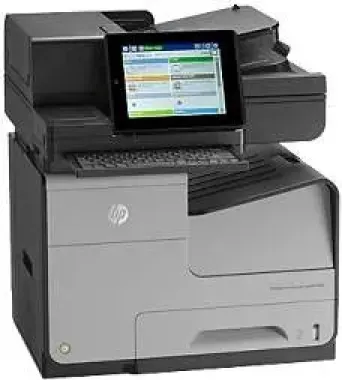
A robust machine by HP, this HP Officejet Enterprise Color Flow MFP X585z can perform with double the speed. The advanced working mechanism of this printer improves its durability and makes it an efficient printer for all types of offices. The higher-level security features allow printing confidential documents with ease. The 8-inch color touchscreen display gives full control to the user.
HP Officejet Enterprise Color Flow MFP X585z cartridges.
HP980 Black Officejet Ink Cartridge yield (~10000 pages), HP 980 Cyan Original Ink Cartridge yield (~6600 pages), HP 980 Magenta Original Ink Cartridge yield (~6600 pages), HP 980 Yellow Original Ink Cartridge yield (~6600 pages)
There are some specific system requirements. It can work with the various operating systems including Microsoft Windows, Macintosh, Linux, and UNIX. Within the Windows operating systems, the versions XP, Vista, 7, 8 and Windows 10 support the printer. A 64-bit PCL6 Universal Print Driver is available for Windows 11. All these operating systems need a minimum of 200 MB of free disk space to install the firmware for the printer. The Macintosh users working with the Mac OS X 10.6 to the Mac OS X 10.8 should have 1 GB of empty storage space on the system. Added to these versions, the printer is also compatible with the latest Mac OS X 10.14.
HP Officejet Enterprise Color Flow MFP X585z Drivers for Windows
de7d1790468899213950fc2df11a442a5b3e4069a9fccf4b62e0aa7c30ed44bf4da7d27d6c0e7d64734e52b5de2501d96bccc1acd55e0f9e99d4f8a910534a5b271119d4a9712e5b87b4fd8cfcbbdff401a464fcef36d5714e59687264831537790d4354da6f3c56d7955b4fb29cf475dcf9d07febc82e4aaa7cd653f2238540d2f18088da8df16f0017983756626431eeeeddb0e386dd19a223c89e5a6a9c4fce728403422ec1c590fb971561abec94e476484815326373058a39afd61bccc28cba26b97b528443fd853bd04b73d2a13e378ef3a7a5630bf9784910a8e6a09e1254b78a9bce9455cda4818154204596693481f141ea24135400a03b2d6cff2bffd4461878d45eaec730b237a247946f968fd4a9e51a03d7c49775cefdfbc61aa64a14568e484b3d08f3338dc709287193f7b7cd8f109518b28c3ae0701bc69f822ffbb02f33a5d18f8485b0674c35efc801e8890cf1dde41137c0956a7eed880693173d8d1f6947263cafc7c835af79ba70153feb0bd4453f557497c24c8930037d971359cf89f9333e8ee9616e32b360ad424519b4d9f60f41c63e02b26e4341828dc31c13c10f42f9a3d38f98e3306b0acae2a60b9228f4f8561f6e56e2c8f938a5f1efeb1cfbcc16a16e890240bbc89428f0d5a90a0ecc9b1f35e3983d1074a380a23437c4fefad00a5e8eb4e07567573dcbb0252028ec8cb705964e9a77HP Officejet Enterprise Color Flow MFP X585z Drivers for macOS
8f24fa0f77e76f4013f26fd7fb8b50a43bcee1cf14873746a0f571d0222a0db2cba1598dc5d03fbf28fa649dafca5cd251f273066cc3a050966834a73ba66c3e20b247df0eafd601585d9f8502f522e67f15d818a7222f76fc7d2cd7cb19384cHP Officejet Enterprise Color Flow MFP X585z Specifications
The high-speed working mechanism of the printer allows it to complete 75 pages in one minute. Higher speed and high quality of the printer are reflected in its 2400 x 1200 dots per inch print resolution. It can also print up to 80,000 pages per month easily.
The flatbed scanner including the automatic document feeder scans up to 63 pages per minute in color and 65 ppm in monochrome. Moreover, the user can also send the scanned images to e-mail, fax, network folder and USB drive connected to the printer.
The input tray capacity for the printer is 500 plain sheets and 50 multipurpose sheets in the second tray. The output tray’s capacity is 300 sheets.
Technical Details
| Title | HP Officejet Enterprise Color Flow MFP X585z Drivers |
|---|---|
| Device Type | All-in-one printer |
| Driver Version | Varies by driver and operating system |
| Available Downloads | Drivers |
| License | Free |
| Manufacturer | HP Inc. |