
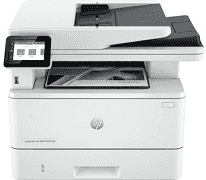
The driver of HP LaserJet Pro MFP 4101fdn is a fantastic component that determines the functions and operations of the machine. The driver influences the machine’s multifunctional ability, including printing, copying, scanning, and faxing documents. For example, it supports a resolution (black) of up to 1200 x 1200 dpi; the first page out (ready) supported is as fast as 6.1 seconds. At the same time, the monthly duty cycle supported is up to 80,000 pages. Meanwhile, the recommended monthly page volume is between 750 and 4000 pages.
HP LaserJet Pro MFP 4101fdn Drivers for Windows
20efb3f3eb62964bd51f3d57e5d20684c5a6c86192d722529aa2286e4dd52455aa0d2202e0b7036d8570f49bca1311254e7dbe7aaccd63087f4e5772bae38df8ef41ad554c86ef1d1f193dbc463bde0d0dfe2c3fa5c175da2afb9c6ae05ff97ff553ab1ed9b53b813cf4479bcbf64da595ae91b75188fe9e0c5d23131da58ef8295e4df666fa875808094cc76ae55c09d48cde9bf03432f7eef7830896974bb6c579f0c3e2b15c2cf0ca01a4e202172c2cb8c6cb03bda45aed2d6b0f4af517a994fb9f4a832efdd01ffc16af784c0ad85289fe87d75d0de11ff322566145eec8f60f54f607e9fd0d98b991b0f273a370b1c1112f794d818060416b2a65cf1f9256a177a1871b207548b705683228aa1673d266d2a663ddfa94f7022a12b390b6eb727293767ac87183406c24c35cea7756c5b4acbcd130e968e6f166c6c95c08bea1ab4fb7079681cb60e7dcc19ffdcaa8f955a7b4c018f4b44c5ff05cf20973b5e03eff7772b8ff14e6bc09e7d3ece79fdc058ac93e597d4de58ea65cd131a1680967e8c32026bc2071ce27a65e55a2e26501f405a8a09c0324f59a974f1cc2252e3bb84737038c907650b13a150fe34cfaddc5810fa8a17e29b0e1e3e49fed9086a918c0d2b80dc034ad79fe64f90fc0fb244fb9ed7af2c3c9e71cf03979831088425bc237bfabaf7ff8fedb6675d2bc6a55836caa899688eda82c404247313e1529cc2cf7f249d20d574f41e6d32f7e9ce1341e11553bec91c6fa19a34663ad6ee417edae1d6ae7ccf0d7b9a1c7558d6cf7bc78001ae5a9a2c36a2bf60406f50dad657f400372a066f31d5596db54ad4d289fdcdaf11f1209f7c83f8ebfaeHP LaserJet Pro MFP 4101fdn Drivers for macOS
39dc41d9745c7870be9f30479758a5aad585eed02446df9a91a9057084120272HP LaserJet Pro MFP 4101fdn Specifications
Furthermore, it supports Laser print technology with black cartridges and two replacement cartridges. For instance, it works with HP 148A Black Original LaserJet Toner Cartridge with a 2,900-page yield. Also, it supports the HP 148X Black Original LaserJet Toner cartridge with a 9,500-page yield. Meanwhile, its mobile printing capability includes HP Smart App, Apple AirPrint, and Mopria Certified. Also, it works with various media sizes, including Legal, executive, Oficio (8.5 x 13 in), 16K, Japanese Postcard, and Double Japan Postcard Rotated.
In addition, the supported media sizes on Tray 1 include 3×5 to 8.5 x 14 in and 4.12 x 5.83 to 8.5 x 14 in on Tray 2 and 3. Meanwhile, the supported media types are plain, EcoFFICIENT, light, heavy, bond, colored, and letterhead papers. Also, it works with preprinted, prepunched, recycled, and rough paper with envelopes and labels. In addition, the supported media weight on Tray 1 is 16 to 53 lb and 16 to 32 lb on Tray 2 and the optional 550-sheet Tray 3.
Similarly, the media weight by paper path on Tray 1 is between 60 and 200 g/m², while on Tray 2 and the optional 550-sheet Tray 3 it is between 60 and 120 g/m². On the other hand, the supported operating temperature range is 50 to 90.5°F, and the operating humidity range is between 30 and 70% RH.
Technical Details
| Title | HP LaserJet Pro MFP 4101fdn Drivers |
|---|---|
| Device Type | All-in-one printer |
| Driver Version | Varies by driver and operating system |
| Available Downloads | Drivers |
| License | Free |
| Manufacturer | HP Inc. |