
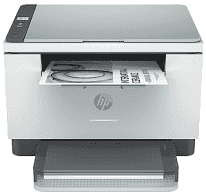
HP LaserJet MFP M232dwc Driver helps the computer communicate correctly with this multifunction laser printer. Once recognized, the device can handle printing, scanning, and copying through the computer. Wired or wireless connections can carry print and scan commands, while proper driver support keeps device communication stable. Correct setup also helps the printer process jobs accurately and produce the expected output.
HP LaserJet MFP M232dwc Drivers for Windows
98f87898be159c3820f395e39b3613150133ca4f6ef11bf00e3375ecd72e69f7620068045902345004931235f980d18321eb73b2b9e83672a905b17b6e823677b43e074dd8d4aa3f8bfd43bcf90e6fe132b6dacd28543d9c29bf70cc6d06c67733a48d17157441a5f626bf8b2b5f85c04c1a524bacff1c548f899ad90978765ec11fe40d2b794ffeb0c9f87b6f22efe7b178646c583b58276f0dc4b24872778a49aee77d43d920b362885f4bdc240b68dca11ed11c603fd326dea9ecef33110b4e19a78f0f7887e81a3c71b6bafd43b4a6cc10bf39228f932118cff6b9a06b79b334974dff8c24b8ce9b24aabde122922f969419b3f2b9f6be4ce9e605b888c99d251979bf6c8f2779239a0bcd2bdf9ecd562da49e38eeec37f46303ea8e3c6d83d239d64aa753b224ac1a5c229527fba7a264eb3653fb95af54a387b27b3b1b83d239d64aa753b224ac1a5c229527fba7a264eb3653fb95af54a387b27b3b1b83d239d64aa753b224ac1a5c229527fba7a264eb3653fb95af54a387b27b3b1bHP LaserJet MFP M232dwc Specifications
The HP LaserJet MFP M232dwc combines monochrome laser printing with flatbed scanning and copying. Originals go directly on the scanner glass because no automatic document feeder is fitted. Local copy work and status checks use a small icon LCD with dedicated buttons. Inside, 64 MB of memory holds print data while a job is being processed.
A4 documents print at up to 29 pages per minute, and resolution reaches 600 x 600 dpi. Automatic duplexing turns the paper inside the machine, so two-sided print jobs do not need manual sheet flipping. Scans are made one original at a time on the flatbed. Copy output also reaches 600 x 600 dpi, with enlargement or reduction from 25 to 400 percent and as many as 99 copies from one original.
The main tray holds 150 sheets, compared with 100 sheets in the output area. Common office paper such as A4, A5, A6, Letter, and Legal fits the input tray; supported envelopes can be loaded there as well. Automatic paper sensing helps the printer identify loaded media. For a multipage scan or copy job, however, each original has to be placed on the flatbed separately.
A nearby computer can use the USB connection, and wired network access is available through Ethernet. Wireless jobs can travel over 802.11b/g/n Wi-Fi, or compatible devices can connect directly with Wi-Fi Direct when a router connection is not needed. Mobile printing also works with Apple AirPrint, Mopria, and the HP app. With the body closed, dimensions are about 368 x 298.6 x 241.9 mm, and weight is approximately 7.6 kg with toner installed.
Technical Details
| Title | HP LaserJet MFP M232dwc Drivers |
|---|---|
| Device Type | All-in-one printer |
| Driver Version | Varies by driver and operating system |
| Available Downloads | Drivers |
| License | Free |
| Manufacturer | HP Inc. |