
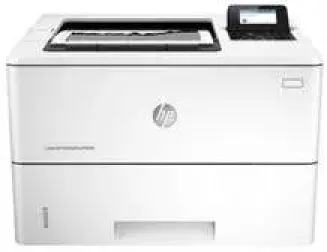
The HP LaserJet Enterprise M506n is a leader in power saving among all the other printers of the same class. The comprehensive security feature of the printer makes it a robust security expert and protects documents effectively. The user can print from anywhere anytime with this wireless printer. The interactive touch screen panel provides a secure control mechanism for all the printing jobs.
HP LaserJet Enterprise M506n toner cartridge.
HP87A Black Original LaserJet Toner Cartridge yield (~9000 pages), HP 87X Black Original LaserJet Toner Cartridge yield (~18,000 pages)
This printer has full compatibility with all the old and new versions of the Windows operating systems. For Windows XP, Vista and Windows 7 the system should have at a minimum 200 MB of free disk space to install the firmware. Along with these Windows operating system versions, the Windows 8 and Windows 10 can also support the printer. A 64-bit PCL6 Universal Print Driver is available for Windows 11. When working with the Macintosh operating systems, the users running the operations with Mac OS X 10.8 to 10.10 can connect with the printer easily. For this, they only need 1 GB of free storage to install the printer drivers and other firmware. Added to this, the printer has full compatibility with the latest Mac OS X 10.14 (Mojave).
HP LaserJet Enterprise M506n Drivers for Windows
c9c768555823fe6d66cea72fdd9ca3fe33925dd9eb2dcb0e917886f0335a3efc9cf08b80637dd7068df5598642b3679c5d1b9cc54eb3678adffa56a109d318eaf4f0735d5291bfa251eb9ed80994ce606809fa8f1dd1cb52be216580055949eac14e10c75573bde8a67248cf08c06869ee8a8ee9ea75cb38bda97d5dd3886b65a25823c6888a65e5de961755c51da05862cd6e8518a17dd01e886bd9133829af227bff1aee88d6ca5c8f5cacb61be83249c30377cd4cb29716df50bd06b7843e9ed3baca2bec5ae5dbc096007acda00e7d8654bf098008aa2779d10c39507852ffd4461878d45eaec730b237a247946f968fd4a9e51a03d7c49775cefdfbc61aa64a14568e484b3d08f3338dc709287193f7b7cd8f109518b28c3ae0701bc69f822ffbb02f33a5d18f8485b0674c35efc801e8890cf1dde41137c0956a7eed880693173d8d1f6947263cafc7c835af79ba70153feb0bd4453f557497c24c8930037d971359cf89f9333e8ee9616e32b360ad424519b4d9f60f41c63e02b26e4341828dc31c13c10f42f9a3d38f98e3306b0acae2a60b9228f4f8561f6e56e2c8f938a5f1efeb1cfbcc16a16e890240bbc89428f0d5a90a0ecc9b1f35e3983d1074a380a23437c4fefad00a5e8eb4e07567573dcbb0252028ec8cb705964e9a77HP LaserJet Enterprise M506n Drivers for macOS
8f24fa0f77e76f4013f26fd7fb8b50a43bcee1cf14873746a0f571d0222a0db2HP LaserJet Enterprise M506n Specifications
The printing speed of the HP LaserJet Enterprise M506n for the black and white documents is 43 pages per minute. It can also print the first page after turning on for the first time within 6 seconds. The printing resolution for the standard and best quality lies between 600 x 600 dpi for standard documents and 1200 x 1200 for best quality.
This printing resolution is possible due to the HP FastRes 1200 and the HP ProRes 1200 printing technology. It can efficiently print on different media types and papers including the cardstocks, labels, envelopes, plain paper, recycled paper, and rough paper. The duty cycle of 150,000 pages per month makes it an efficient printer for large office printing jobs.
Technical Details
| Title | HP LaserJet Enterprise M506n Drivers |
|---|---|
| Device Type | Printer |
| Driver Version | Varies by driver and operating system |
| Available Downloads | Drivers |
| License | Free |
| Manufacturer | HP Inc. |