
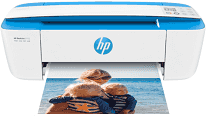
The HP DeskJet 3755 is a printer for smarter homes and smarter people. This printer encompasses all the functions of print, copy, and scan. With its wireless printing capability, one can have the freedom to print on the go and the ability to print from everywhere in the house. This printer has ENERGY STAR certification and is the world’s smartest all-in-one home printer.
HP DeskJet 3755 Drivers for Windows
2bb42bc15cc22ef5f82ea776328e3506f9f438ba31864dc5f04f6f2ba87989c22bb42bc15cc22ef5f82ea776328e3506f9f438ba31864dc5f04f6f2ba87989c23401fe2111c03c5c77230dc47e2e995aba70d04bfb7105ed8f9c964984f54c57d73c6d795416647041cfce0d4e52a679c54b62847d12886f5c7612791c75967037bccb1ab98b0942032ad3e26300ab137ca027c90d380fbd40dbd18e974feeeed2f18088da8df16f0017983756626431eeeeddb0e386dd19a223c89e5a6a9c4fce728403422ec1c590fb971561abec94e476484815326373058a39afd61bccc23fde19a1986c28b034d1b038221e9e116c8c5d01e533ee77df54c884b60526a4HP DeskJet 3755 Drivers for macOS
99e1d18847c64a405486ae34424f0a1c8d89920d17df86c45b6b0007f101d70ae42fb243082e789de3cd721316447df2622404b1fca087f9856fc28174596313HP DeskJet 3755 All-in-One ink cartridge.
HP65 Black Ink Cartridge yield (~120 pages), HP 65 Tri-color Ink Cartridge yield (~100 pages), HP 65 XL Black Ink Cartridge yield (~300 pages), HP 65 XL Tri-color Ink Cartridge yield (~300 pages)
When connecting the smart printer to a system running Windows XP, the system requires an Intel Pentium II processor combined with 512 MB of RAM. For Windows Vista and 7, it requires a 1 GHz processor and 2 GB of RAM. Along with these versions, it runs successfully with the latest Windows 8 and Windows 10. The printer has full compatibility with the Macintosh operating system version Mac OS X 10.9 to 10.11. With these versions, installing the firmware in the system requires at least 1 GB of free disk space. This printer has full compatibility with the latest Macintosh operating system version Mac OS X 10.14.
The printing technology of the printer is drop-on-demand thermal inkjet technology. The print resolution for colored prints is 4800 x 1200 dots per inch, and for the black and white documents, it is 1200 x 1200 dots per inch.
The digital image processing mechanism in the copying system gives vivid copy quality. The copying speed also varies; for black and white documents it is 4 copies per minute and for colored documents it is 2.5 copies per minute.
The scanner is TWAIN compliant, and the scan resolution of the HP DeskJet 3755 can reach up to 600 x 600 (dpi). The user can insert up to 60 plain sheets in the input tray and 20 photo paper sheets. The output tray, however, can store up to 25 plain sheets and 20 photo paper sheets.
Technical Details
| Title | HP DeskJet 3755 Drivers |
|---|---|
| Device Type | All-in-one printer |
| Driver Version | Varies by driver and operating system |
| Available Downloads | Drivers |
| License | Free |
| Manufacturer | HP Inc. |