
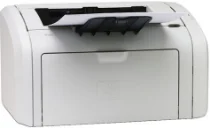
HP LaserJet 1018 Drivers for Windows
520b8fdf43f4cf2841a5b4d1535789b84425aac9a1e7be0ece6a6dda70ecb241d6d4393576030f1b253316f4c6c9b7af3b122244b0a4fce98e3b11b11a19172d1792e421812afdaa234d353d57c12c9d41bb07436f7eb026956fda915bc96dc85284e27e8f8669088f482e391341097faefa856c0571e39bbf5afd1140f3526c6f57df2428a603c7e53f96dfb1dc5e108ddbb9b27188976686ed3aade227122eSpecifications
The price of this HP product has been reduced, and it offers the best service at a ridiculously low cost of purchase and maintenance. The HP 1018 printer is a price contender when it comes to printers. The HP LaserJet 1018 printer is nicknamed the “personal laser” as it is a very convenient and handy tool for anyone who desires to get high-quality prints with monochrome text and simple graphics. That does not mean it cannot be used for other purposes; it can adequately and efficiently serve as an office printer or complement the work of other printers. The free disk space required for the HP LaserJet 1018 Vista driver is 150 MB.
The printer was designed to meet your needs, and it usually entices with its small size. It stands 8.2 in high, 14.6 in wide and 9.5 in deep. It weighs just about 11 pounds. The footprint of the paper tray is about 14.6 by 13.6 in.
Setting it up for use is quite easy and follows the usual process for monochrome laser printers. First, install the toner cartridge, load your paper into the tray, connect using the USB cable acquired separately and run the HP LaserJet 1018 driver installation routine. Then you are ready to print. Just send in any document you are interested in printing and you are ready to go! To fit in the cartridge, lift the top cover and slide the cartridge in gently until it rotates slightly to lock into position. HP LaserJet printer 1018 toner is HP 12A.
The print speed is just about 12 pages per minute though. The HP LaserJet 1018 driver can easily handle all your text print jobs while the graphics quality is also a characteristic strong point for all monochrome laser printers. In addition to the general abilities, the HP 1018 printer handles thin lines better than many other printers to show its accurate and precise print products. It is very suitable for client newsletters and printing web pages from browsers.
The top surface of the printer has a few indicators comprising two green LEDs that show power or call your attention to a paper jam (on very rare occasions). All the other controls are linked to the HP 1018 software driver. And at the rear side of the machine is the USB 2.0 cable port which stands as the only means of connecting the printer to the computer.
Technical Details
| Title | HP LaserJet 1018 Drivers |
|---|---|
| Device Type | Printer |
| Driver Version | Varies by driver and operating system |
| Available Downloads | Drivers |
| License | Free |
| Manufacturer | HP Inc. |