
There might be some minor problems that happen with HP devices, but it will take quite a while to find out the real cause behind the problem. Problems such as display anomalies, old firmware, and driver conflicts may impact your productivity negatively without you even realizing it, because the symptoms become apparent only when the productivity level decreases.
Available Windows Downloads
cacd1fd9b60568a9d2cdc1e86dbbead80f8aba35655249c06d293463551aea5dHow to Use HP Image Assistant (HPIA) to Update HP Drivers and BIOS
Updating of HP laptops and desktops is one of the important factors that determine their performance and security. Outdated drivers and BIOS versions not only influence the performance of the computer but may also cause some hardware malfunctioning, crashes, and other errors.
HP Image Assistant is an application that was created by HP in order to help its customers find out whether there are any outdated drivers or BIOS versions on the computer. HP Image Assistant updates them if necessary. This guide shows you how to download and use HP Image Assistant in order to keep your HP computer up-to-date.
What Is HP Image Assistant?
HP Image Assistant serves both as a diagnosing and managing tool for your HP system. It verifies the drivers, BIOS, and software of your HP machine against what is suggested by HP. It can even help you update these if you so want.
Main Features
- Find obsolete HP drivers
- Check for BIOS updates
- Detect missing software components
- Download HP SoftPaq updates
- Produce system reports
- Portability (installation-free)
Why Should You Use HP Image Assistant?
HP Image Assistant can help you with the following problems:
- Issues with HP printer, Wi-Fi, audio, or graphics drivers
- System performance issues
- Lack of hardware device detection
- Problems related to Windows update
- BIOS and system stability issues
- Missing or outdated HP software components
HP Image Assistant usage will also ensure your system stays safe and efficient.
Get HP Image Assistant
Click the link above to download the latest version of HP Image Assistant.
After downloading the file, you should:
- Save it to any location on your PC.
- Unpack the ZIP file.
- Open the unpacked folder.
Within the folder, you will see the HPImageAssistant.exe file.
Run HP Image Assistant
The greatest advantage of HP Image Assistant is that it is a portable tool, and there is no need to install it.
Steps:
- Open the unpacked folder.
- Double-click HPImageAssistant.exe.
- Wait for a few seconds until the application opens.
The utility will open as portable software and is ready to analyze your system now.
How to Update Drivers and BIOS Using HP Image Assistant
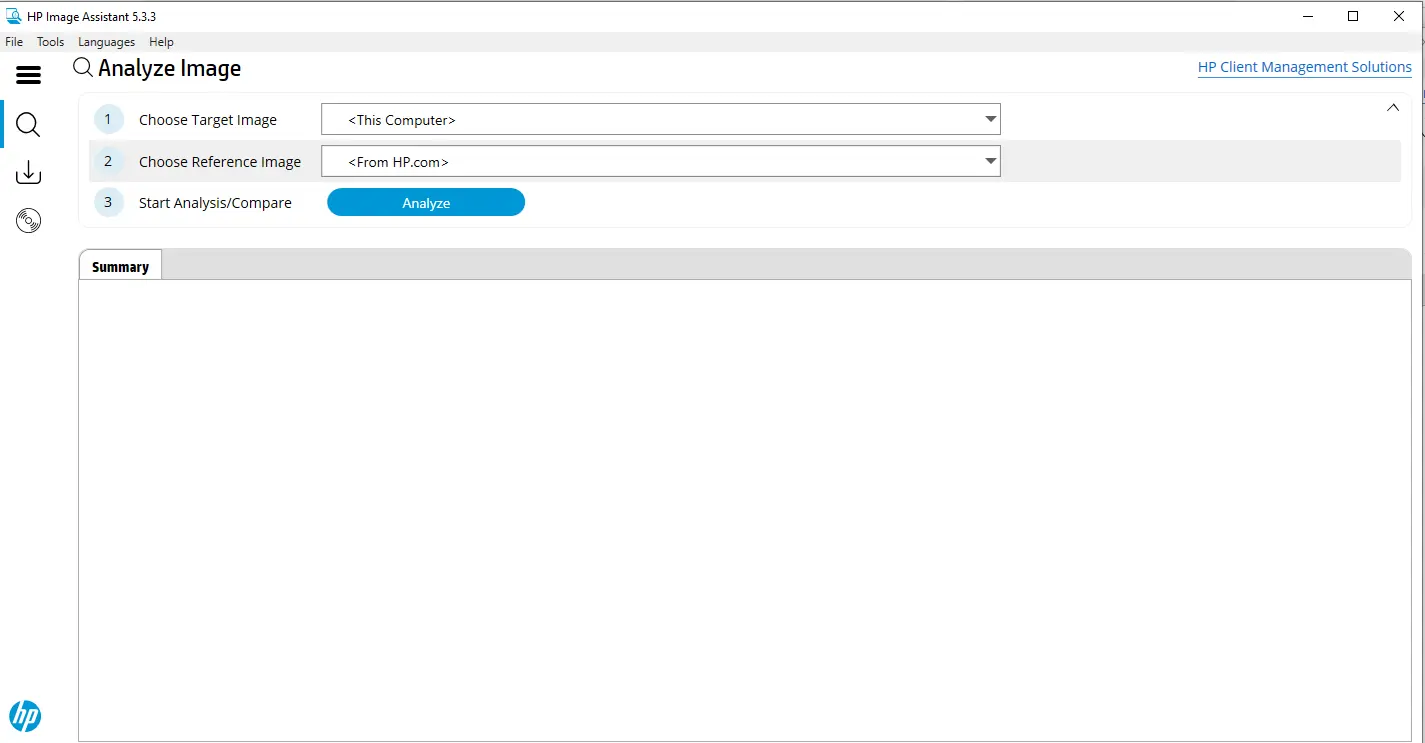
Step 1: Select the Current System
When you launch HP Image Assistant:
- Choose Current System.
- This will instruct the utility to analyze your current computer.
Step 2: Run the System Analysis
- Click Analyze.
- The utility will start analyzing your system.
The analysis will include:
- Drivers
- BIOS
- HP components
- Security settings
Usually, the analysis will take less than 5 minutes, depending on the hardware configuration.
Step 3: Examine the Scan Results
Immediately after the scan is done, you will see:
- Driver updates recommendations
- BIOS updates
- Missing components
- Compatibility info
Please be sure to check the recommendations before proceeding with updates.
Download HP Driver Updates
Now that you are satisfied with the results, you can proceed with the update:
- Click Download button next to each SoftPaq.
- Acknowledge the terms and conditions if asked.
- Download the necessary files.
The SoftPaqs are official HP packages including drivers, firmware, and software updates.
Install the Updates
After downloading the updates, you should:
- Click Install Updates.
- Select the updates you want to install.
- Follow the instructions.
Some updates, such as BIOS updates, might require you to reboot your system.
Note
You should take into account the following list of instructions when updating your BIOS:
- Have your laptop charger plugged in.
- Do not interrupt the update process.
- Close all open work before restarting.
An interrupted BIOS update process might leave your computer unbootable.
Generate System Report
HP Image Assistant can create detailed reports for your troubleshooting, auditing, and support needs.
Steps:
- Select Generate Report.
- Choose a format:
- HTML
- XML
- Save the report to your desired location.
This data might come in handy when you are working with your IT support or troubleshooting driver issues.
Benefits of HP Image Assistant
You will enjoy the following advantages by using HP Image Assistant:
- Better system performance
- Better hardware compatibility
- Security updates installed
- No more driver issues
- Quicker troubleshooting
- Easier BIOS management
Many people noticed better stability and increased responsiveness after applying the recommended updates.
Troubleshooting HP Image Assistant
HP Image Assistant Does Not Start
Try the following solutions:
- Run HP Image Assistant as an Administrator.
- Re-download and reinstall the application.
- Temporarily disable your antivirus software.
- Make sure your Windows is updated.
Updates Are Not Found
In case updates are not found:
- Check if your device model is supported by HP.
- Make sure your Internet connection works fine.
- Re-download a new version of HPIA and run the scan again.
Cannot Download SoftPaqs
Try these solutions:
- Check if your firewall does not block the operation.
- Make sure your device has enough free space on a hard drive.
- Run HP Image Assistant as an Administrator.
FAQs
Is HP Image Assistant Free?
Yes. It is completely free to download and use.
Do I Need to Install HP Image Assistant?
No. It is a portable tool, which means there is no need to install it.
Can HP Image Assistant Update BIOS?
Yes. It will detect available BIOS updates and will allow you to install them.
Is HP Image Assistant Safe?
Yes. It is an official HP tool, and it uses only official HP drivers and firmware packages.
Can HP Image Assistant Fix Driver Issues?
HP Image Assistant can help you with fixing many driver-related issues using updated and compatible HP drivers. However, it cannot fix the issues caused by hardware failure.
Conclusion
The HP Image Assistant program is one of the easiest-to-use tools to update your HP drivers and BIOSes, as well as to carry out the general maintenance of your computer system.
In case you have problems with your drivers, hardware detection, or performance in general, HP Image Assistant will help you fix everything. An HP system update is an important part of maintaining the stability and security of your system.
Technical Details
| Title | HP Image Assistant |
|---|---|
| Device Type | Other |
| Driver Version | Varies by driver and operating system |
| Available Downloads | Utilities |
| License | Free |
| Manufacturer | HP Inc. |