
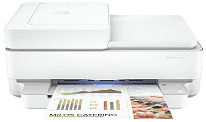
HP ENVY Pro 6400 Driver lets the computer identify the all-in-one printer and send the correct instructions for printing, scanning, and copying. During setup, the software links those functions to the selected USB or wireless connection. Scan data then returns to the computer through the same active connection. Once installation is complete, print settings and other job commands can reach the printer correctly.
HP ENVY Pro 6400 Drivers for Windows
0650cf0f0602aaa76b6b84097476f010da329f6a2e8ace9ca683e8a2af15af9b620068045902345004931235f980d18321eb73b2b9e83672a905b17b6e823677b43e074dd8d4aa3f8bfd43bcf90e6fe132b6dacd28543d9c29bf70cc6d06c67733a48d17157441a5f626bf8b2b5f85c04c1a524bacff1c548f899ad90978765ec11fe40d2b794ffeb0c9f87b6f22efe7b178646c583b58276f0dc4b24872778a49aee77d43d920b362885f4bdc240b68dca11ed11c603fd326dea9ecef33110b4e19a78f0f7887e81a3c71b6bafd43b4a6cc10bf39228f932118cff6b9a06b7983d239d64aa753b224ac1a5c229527fba7a264eb3653fb95af54a387b27b3b1b83d239d64aa753b224ac1a5c229527fba7a264eb3653fb95af54a387b27b3b1bHP ENVY Pro 6400 Specifications
HP ENVY Pro 6400 is a thermal inkjet all-in-one series that prints, scans, and copies. Ink comes from one black cartridge and one tri-colour cartridge, though the cartridge numbers depend on the sales region. Single originals sit on the flatbed. Longer document sets can pass through the 35-sheet automatic document feeder instead. There is no touchscreen; illuminated buttons, status symbols, a copy counter, and the front light bar show the current settings.
Document printing reaches up to 10 ISO pages per minute in black and 7 pages per minute in colour. Automatic duplexing turns the paper for supported document sizes, so ordinary two-sided jobs do not need manual reloading. Borderless printing reaches 8.5 x 11 inches, but only on compatible paper sizes. The scanner reads at up to 1200 dpi from the glass or document feeder. Its largest scan area is 215.9 x 297 mm, and copies are produced at up to 300 x 300 dpi.
The input tray takes 80 sheets of plain paper. Smaller loads apply to other stock: up to 30 photo sheets, 40 index cards, or 10 envelopes. That capacity is suited to home and light office work rather than long unattended print runs. Printed documents collect in a 25-sheet output area. Space falls to five envelopes or ten photo sheets when thicker media is used. Plain paper can weigh from 60 to 90 g/m², while cards reach 200 g/m² and photo paper reaches 300 g/m².
A nearby computer can use the rear USB connection. For wireless jobs, the printer joins either a 2.4 GHz or 5 GHz Wi-Fi network. Wi-Fi Direct links a compatible device without relying on the home router, and mobile printing can use AirPrint or Mopria. With its trays closed, the body measures about 432.5 x 361.1 x 174 mm and weighs roughly 6.16 kg. Power consumption falls to around 4 watts in the ready state and 1.7 watts during sleep.
Technical Details
| Title | HP ENVY Pro 6400 Drivers |
|---|---|
| Device Type | All-in-one printer |
| Driver Version | Varies by driver and operating system |
| Available Downloads | Drivers |
| License | Free |
| Manufacturer | HP Inc. |