
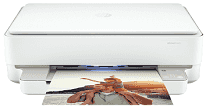
HP ENVY 6000 Driver helps the computer identify this all-in-one printer during setup. After the connection is recognized, print jobs can move from the computer to the printer, and the scanner can send pages back the other way. Copying stays available from the printer side because the hardware includes that function. The installed software keeps selected print and scan settings tied to each job, so the computer does not treat the printer as an unknown device after setup.
HP ENVY 6000 Drivers for Windows
9bf14d03b9435b2f2ce251c337614adbf85d3404f682681aa588809885b99571620068045902345004931235f980d18321eb73b2b9e83672a905b17b6e823677b43e074dd8d4aa3f8bfd43bcf90e6fe132b6dacd28543d9c29bf70cc6d06c67733a48d17157441a5f626bf8b2b5f85c04c1a524bacff1c548f899ad90978765ec11fe40d2b794ffeb0c9f87b6f22efe7b178646c583b58276f0dc4b24872778a49aee77d43d920b362885f4bdc240b68dca11ed11c603fd326dea9ecef33110b4e19a78f0f7887e81a3c71b6bafd43b4a6cc10bf39228f932118cff6b9a06b7983d239d64aa753b224ac1a5c229527fba7a264eb3653fb95af54a387b27b3b1b83d239d64aa753b224ac1a5c229527fba7a264eb3653fb95af54a387b27b3b1bHP ENVY 6000 Specifications
HP ENVY 6000 is a cartridge-based colour all-in-one printer with print, scan, and copy functions. Printing comes from a drop-on-demand thermal inkjet system using one black cartridge and one tri-colour cartridge. The flatbed sits beneath the lid, and illuminated buttons take the place of a conventional screen. Fax hardware is absent. There is no automatic document feeder, so every original must be positioned on the glass by hand.
The scanner records originals at up to 1200 dpi optical resolution, with hardware resolution listed at 1200 x 1200 dpi. Its glass accepts pages up to 215.9 x 297 mm. Colour scans use 24-bit depth, and grayscale scans use 8-bit depth. Copies reach up to 300 x 300 dpi in black or colour. Automatic duplex printing can turn compatible document and photo paper without manual page handling.
The enclosed input tray takes up to 80 sheets of plain paper. It can instead hold 30 photo sheets, 40 index cards, or 10 envelopes, so mixed paper jobs require the tray to be reloaded. Printed pages collect at the front, where capacity drops to 25 plain sheets. The same output area holds five envelopes or 10 photo sheets. Plain paper can weigh 60 to 90 g/m², cards up to 200 g/m², and photo paper up to 300 g/m².
Dual-band 802.11b/g/n Wi-Fi links the printer to a wireless network. Wi-Fi Direct creates a separate connection for a compatible phone or computer when no router is available. A rear USB port serves one nearby computer during a wired setup, and Apple AirPrint can send jobs from compatible mobile devices. Status details appear through the cartridge and paper lights, illuminated buttons, and the edge-lighting bar. Users must interpret those signals because the control panel has no touchscreen or conventional LCD.
Technical Details
| Title | HP ENVY 6000 Drivers |
|---|---|
| Device Type | All-in-one printer |
| Driver Version | Varies by driver and operating system |
| Available Downloads | Drivers |
| License | Free |
| Manufacturer | HP Inc. |