
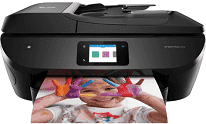
Printing with the HP ENVY Photo 7820 model is with the HP thermal inkjet print technology with duplex printing. The duplex feature enables the device to print on both sides of the page by itself. In terms of the speed, the ISO mode runs up to 15 pages per minute (ppm) for black printing. On the other hand, in the same style, the color printing runs at a speed of 10 ppm. The resolution of the printing process is up to 4800 x 1200 optimized dpi for color printing in best mode.
HP ENVY Photo 7820 Drivers for Windows
344b35721f708134646aacf9545d4f763bfe9a4a65eaaf78df73efe241ada452fd6c1b5b35079ff2ce1068b0bef8ccd6d367d04a02b7bfec4f07cf7702da56f1837487decedd1fee40037a912fc720b8ac14664c4f5a48abfe08efd890ef409f7ad5230f5d2857e46d93a6ad839c1b2a69d2525618df71a1d3b1ea05ad853150295e4df666fa875808094cc76ae55c09d48cde9bf03432f7eef7830896974bb6ecf28f0717030232a035fad7526cd778413b4e2675042cf8312b0a0889e914d913ecf6c05f207b5f1461a1499e01750b661a113c5dc8a720b8699bdfd74f0d25f60f54f607e9fd0d98b991b0f273a370b1c1112f794d818060416b2a65cf1f9256a177a1871b207548b705683228aa1673d266d2a663ddfa94f7022a12b390b6cc5c7d9a9f83c8f0133c25117e3ec2eddb63bb42f93ef455246cb578202c6e93f50dad657f400372a066f31d5596db54ad4d289fdcdaf11f1209f7c83f8ebfaef50dad657f400372a066f31d5596db54ad4d289fdcdaf11f1209f7c83f8ebfaef50dad657f400372a066f31d5596db54ad4d289fdcdaf11f1209f7c83f8ebfaeHP ENVY Photo 7820 Drivers for macOS
99e1d18847c64a405486ae34424f0a1c8d89920d17df86c45b6b0007f101d70aHP ENVY Photo 7820 Drivers for Linux
dc173d7b548017175b452547b29f8231e58c4302cfc60f9ae19a1ee649357bc3HP ENVY Photo 7820 Replacing Cartridges
HP 804 Black Ink Cartridge (paper yield ~ 200 pages)
HP 804XL Black Ink Cartridge (paper yield ~ 600 pages)
Tri-color Ink HP 804 Cartridge (paper yield ~ 165 pages)
HP 804XL Tri-color Ink Cartridge (paper yield ~ 415 pages)
The maximum print area is 209.9 x 349.6 mm while the monthly duty cycle is up to 1000 pages. The compatible print language is the HP PCL3 GUI emulation. Scanning is through the modern CIS technology with 256 levels of grayscale. The scanning option includes a single-sided process with a maximum flatbed scan size of 216 x 297 mm. The printer also runs Twain version 2.1. The energy-saving feature is the HP auto-off technology with a built-in universal power supply.
The power consumption when printing is 13.95 watts, and the active mode is 3.6 watts. The sleep mode requires 0.93 watts, and the ‘off-mode’ takes 0.2 watts. This printer also uses two cartridges, one for black and the other for tricolor in cyan, yellow and magenta. The replacement cartridges include the HP 804 black and tri-color ink cartridges. The black cartridge can print up to 200 pages while the tri-color prints up to 165 pages.
This printer also has an HP SureSupply feature that alerts users when there is a need to replace a print cartridge. The width of HP ENVY Photo 7820 is 453.5 mm, its depth is 502.8 mm, and the height is 193.2 mm. The weight of the printer is about 7.60 kg, which is equivalent to 16.75 lbs.
Technical Details
| Title | HP ENVY Photo 7820 Drivers |
|---|---|
| Device Type | All-in-one printer |
| Driver Version | Varies by driver and operating system |
| Available Downloads | Drivers |
| License | Free |
| Manufacturer | HP Inc. |