
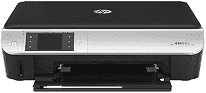
The HP ENVY 5535 can offer the best printing experience to its users. It has a wireless printing mechanism. The printer comes with embedded templates and lined paper designs to allow the users to customize their pages. Its multi-functional peripherals (MFP) can perform the functions of printing, scanning, and copying a range of documents. The paper range of HP ENVY 5535 is plain paper, legal paper, templates, envelopes, photo paper.
For Windows operating systems, Windows XP, Vista and 7 are compatible with the HP ENVY 5535 driver. Windows should have an Intel Pentium II processor, and Windows Vista and seven should have a processor running at more than 800 MHz. The RAM in Windows XP should be 128 MB minimum, and in Windows Vista, it should be 512 MB and 1 GB for Windows 7. For Macintosh operating systems, MAC OS X 10.6 to OS X 10.11 are compatible with it.
HP ENVY 5535 Drivers for Windows
a44eea129683f7dd5e798f9da265af958a4a79539ebfc4706b662a447dfebd9bcf396faa9d9f1718f54761e3e1c8013eb08368ac36cf528b090031f2e9498d47772abb50008fb7dc49cd4fdfb51a355248947f5b0881013da3481ac178293343d2f18088da8df16f0017983756626431eeeeddb0e386dd19a223c89e5a6a9c4fce728403422ec1c590fb971561abec94e476484815326373058a39afd61bccc2HP ENVY 5535 Drivers for macOS
99e1d18847c64a405486ae34424f0a1c8d89920d17df86c45b6b0007f101d70a316905d6bc9c8b21d5a2d4d88dfb01d8ed6ebcc748b95a66e378844c0e8e2f3fHP ENVY 5535 HP Printer ENVY 5535 cartridges
HP 62 Black Original Ink Cartridge (~200 pages ), HP 62 Tri-color Original Ink Cartridge (~165 pages )
The latest operating system of the HP ENVY 5535 driver:
Drivers are available for Windows XP to Windows 11 and macOS 10.6 to 13 in the download section on this page.
Specifications of HP Printer ENVY 5535:
Copy: The maximum resolution for copying the documents is 600 dots per inch. The speed of copying varies according to the paper.
Scan: The optical resolution is 1200×1200 dpi, and it can support various file types while scanning the documents.
Print: The technology used by the HP ENVY 5535 for printing is drop-on-demand thermal inkjet. It uses the PCL3 GUI language for printing the documents.
External connectivity: It works with TCP/IP network protocols and has an inbuilt radio. The network management system allows it to be remotely configured among other printers.
Features of the HP ENVY Printer 5535:
1. The printer can support memory card.
2. Compact in size
3. Lightweight printer
Technical Details
| Title | HP ENVY 5535 Drivers |
|---|---|
| Device Type | All-in-one printer |
| Driver Version | Varies by driver and operating system |
| Available Downloads | Drivers |
| License | Free |
| Manufacturer | HP Inc. |