
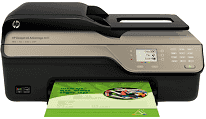
If you are seeking a device with superb functionality and affordable prices, then your quest has come to an end. The HP Deskjet Ink Advantage 4615 is the printer which can serve as a printer, scanner, copier, and a fax machine too. These features make this printer an ideal choice for both household and commercial needs.
HP Deskjet Ink Advantage 4615 Drivers for Windows
bc6223014a8754781d1f5613ed0dd8e513b087fd9db2925691ff1b3724247399d3b18441166da027a867e80a0589bb97c71222c39ad9b14e395e32321e2b4adc9c33db4d4387f7cbedd5641d342ece3dcbc82577e1112dc89f78118b6479a534HP Deskjet Ink Advantage 4615 Drivers for macOS
99e1d18847c64a405486ae34424f0a1c8d89920d17df86c45b6b0007f101d70a9874f88880cef2c9a850473cbe5c8806599eefa2d4a3ed7d6516f93cb6952c4a576fb762a5dc064f615ab6c2e7d3165aab2d279aa727158e644d790898d13334HP Deskjet Ink Advantage 4615 printer requires an input voltage of 100 to 240 VAC with 50 to 60 Hz frequency. It comes with a universal power adapter which ensures that only the specified power reaches the device. Also, the output voltage of the device is just up to +32V/+12V at 313 mA/166 mA. As the power consumption is limited to 13 watts for normal printing mode, the device becomes ideal. Even during copying, the printer only consumes 15 watts of power.
The acoustic emission of this device also lies within the range specified by ISO. It produces a sound with power LwAd 6.8. This device can be kept and stored within a significant temperature range. To place this printer the temperature can lie between -40°C and 60°C. But to use the printer and expect it to perform ideally, the temperature must lie somewhere between 15°C and 32°C. Even the relative humidity must remain within 20% to 90%.
Not many users know that the printer requires a lower electromagnetic range. As electromagnetic radiation affects the working of the device, it is recommended to store it in an ideal environment. The energy star rating of this device assures that it consumes a lower amount of power and saves natural resources. And still, the performance of this device isn’t compromised at all. Even the ozone production of this device is not evident. Moreover, this printer is a part of the HP Recycle program.
Technical Details
| Title | HP Deskjet Ink Advantage 4615 Drivers |
|---|---|
| Device Type | All-in-one printer |
| Driver Version | Varies by driver and operating system |
| Available Downloads | Drivers |
| License | Free |
| Manufacturer | HP Inc. |