
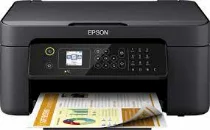
Printing with the Epson WorkForce WF-2810DWF model comes with tremendous advantages that include a 4-color inkjet print technology. Its nozzle configuration comprises 180 nozzles for black printing and 59 nozzles for each color. Also, the minimum droplet size is about three picoliters (pl) with a variable-sized droplet technology. Moreover, the Epson WorkForce WF-2810DWF has an internal driver perfect for operating system usage and excellent print output.
Epson WorkForce WF-2810DWF Drivers for Windows
a34ea48da42c89dce371d03e17246d28b04c0a4a685fc9d02edecd0ff3d3dc0d46733567ddf57c2837fa67b234eb2ab4aaed507945ebd78b4cb1e193eb1a06618a1fc71d87750c5e7573f1dd4b40d771f3914e978f458efa01467128688faf04e296b0dd6f562045ca62037185b78ea08935c2397617465e6551a239e6f13b6cEpson WorkForce WF-2810DWF Drivers for macOS
a3f444082baefeb79d43878529dedb2090fb595c0c45506c5590c8081046559f3c2df543de970b39cd87020340039cfa5ad79eb334626b7e865379bb896180e090071b11984600791b1ab1b58f654ee83a3a90fed5e5b6be2162f41461badfc7Epson WorkForce WF-2810DWF Specifications
The Epson WorkForce WF-2810DWF device can print, copy, scan, and send or receive fax messages as a multifunctional partner. In terms of the printing speed, the ISO/IEC 24734 standard supports color printing at the rate of 5 ppm and monochrome printing at ten ppm. However, standard printing on plain paper has a speed of 33 ppm for monochrome and 18 ppm for color pages. As for Epson premium glossy photo paper, the print rate is 38 seconds per 10 x 15 cm.
In scanning, the single-sided scanning with this machine at 300 DPI is about 2.2 milliseconds per line for black pages. On the other hand, simplex or single-sided scanning for color pages is about seven milliseconds per line at the exact resolution. However, the optical resolution is 1200 x 2400 dots per inch (dpi) for horizontal and vertical sides. It also uses the contact image sensor (CIS). When faxing, the machine has a walk-up black and white or color faxing capability.
Moreover, the error correction model works for CCITU/ITU Group3 fax and has 60 names and numbers. Its page memory can hold up to 100 pages for the ITU-T No. 1 chart. At the same time, the fax functions include PC fax, auto redial, speed dial, and memory reception. By the way, the supported paper formats include A4, A5, A6, B5, envelopes, letters, legal, and photo paper sizes.
Technical Details
| Title | Epson WorkForce WF-2810DWF Drivers |
|---|---|
| Device Type | All-in-one printer |
| Driver Version | Varies by driver and operating system |
| Available Downloads | Drivers |
| License | Free |
| Manufacturer | Seiko Epson Corporation |