
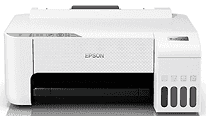
The Epson L1256 printer driver produces clear and accurate printouts for both personal and business purposes. A newly released driver ensures that the user enjoys a stable system and eliminates errors when printing. Setting up the driver is quite easy and can be completed in just a few minutes.
Epson L1256 Drivers for Windows
a1bacd4a388cf3ae24c240efa92557ad76605379be1df8dff28bbfc49f42812de363f293d77e7359ac9863745d14d0b5cc5e2901d0e18e28892371dda7d98c9a372e1e803a89e6c9ce28dc063554ad955e6fc607d406b5f1451d374df0daa333Epson L1256 Drivers for macOS
fbbe3b3fd57d80c3363166530e8d7356c49b845bbad40037cf7685f8994cba1479afba06e1bc044ad98d498d8f3c4a86c1a13f48a766923e74310ce2d1b707d1Epson L1256 Specifications
The Epson L1256 is a single-function printer that works with color ink tanks. The printer works with Piezoelectric InkJet technology in combination with Epson Heat Free Technology. Epson L1256 is capable of providing 5760 × 1440 dpi maximum resolution. The printer prints documents and images clearly and sharply. Moreover, there are no scanning and copying functions in the Epson L1256, which makes it compact and focused on printing only. Epson L1256 is ideal for home and small office usage.
The Epson L1256 is distinguished by excellent speed parameters for monochrome and color printouts. The Epson L1256 can print black and white A4-size pages at a speed of 10.0 images per minute. Colored A4 pages are printed at a speed of up to 5.0 images per minute. The first black page will be printed within about ten seconds. Colored one – within sixteen seconds. Moreover, the printer prints borderless 4R photos within about sixty-nine seconds.
Ink bottles in Epson L1256 include black, cyan, magenta, and yellow colors. A black ink bottle can print up to 4,500 pages. Composite colors of ink will print approximately 7,500 pages. Formats which can be used in the Epson L1256 are A4, Letter, Legal, Envelopes, and photo paper. The printer tray has a capacity of up to 100 sheets of plain A4 paper and thirty sheets of output.
There are several connections in the Epson L1256, such as USB 2.0, Wi-Fi, and Wi-Fi Direct. Users can print wirelessly via Epson iPrint, Epson Email Print, and Remote Print Driver. There is an Epson Smart Panel app for mobile setup, maintenance, and printer control. Epson L1256 operates under Windows Vista to Windows 11 and Mac OS X 10.6.8 or higher. It has the measurements of 375 × 347 × 169 mm and weighs 2.9 kilograms, using 12 watts of power.
Technical Details
| Title | Epson L1256 Drivers |
|---|---|
| Device Type | Printer |
| Driver Version | Varies by driver and operating system |
| Available Downloads | Drivers |
| License | Free |
| Manufacturer | Seiko Epson Corporation |