
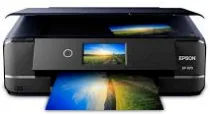
Printing with Epson Expression Photo XP-970 model comprises 6 colors within a drop-on-demand micro piezo inkjet technology. Then, the maximum print resolution is up to 5760 x 1440 optimized dots per inch (dpi). Moreover, black documents print at 8.5 ISO pages per minute (ppm), and color pages print at 8.0 ISO ppm. This Epson Expression Photo XP-970 has an internal driver that works for duplex printing and is compatible with different OS versions.
Epson Expression Photo XP-970 Drivers for Windows
057d15ef73dca25a93467b35af9c00eb3b263f2d64bad228bd94e5246b6dc64ac5b477fab1738ad9932baa5b9ddd0e8497da2f39f9a1e91f80ac6322570312d288d171895a5bba99f05d91c655d0619ca3db563d79dc175ae7043e851bd3daf9e296b0dd6f562045ca62037185b78ea08935c2397617465e6551a239e6f13b6cEpson Expression Photo XP-970 Drivers for macOS
dd2d3188754d59f5f6c95a499e4299ca148658d4e7bb140e88bebd0dd770589b92d37eadabf5c73f1c950f17ae9e18ec0ddb3530d1e87d1afab2c4ba05269c5190071b11984600791b1ab1b58f654ee83a3a90fed5e5b6be2162f41461badfc7Epson Expression Photo XP-970 Specifications
The printer has up to 5 different ink droplet sizes, with the smallest being 1.5 picoliters (pl). Photo printing with 4 x 6 inches borderless photo paper is as fast as 11 seconds. Moreover, the compatible layouts include borderless, classic borders, picture packages, photo ID, and jewel index. Similarly, it has CD layouts and multiple copies for 2, 4, 8, and 20-up. The compatible ink type is the Claria Photo HD ink.
Generally, this Epson Expression Photo XP-970 printer supports Windows 10, Windows 8, Windows 8.1, and Windows 7 (32-bit or 64-bit). Apart from Windows, this device can also work with Mac OS X 10.6 to Mac 10.14.x. The compatible temperature range is between ten and 350C, but storage is between -20 and 400C. In terms of relative humidity, the operating range is between 20 and 80%, while storage is between 5 and 85% with no condensation.
The sound level emission from this machine is about 49 dB(A), while the net weight is about 19.4 lbs. Similarly, the printer dimensions include 18.9 inches, a depth of 26.3 inches, and 11.6 inches. The copy rate is about 8.1 copies per minute (CPM) for both black and color. Copying can also produce up to 99 copies from an original document. At the same time, the maximum copy size is 8.5 x 14 inches.
Technical Details
| Title | Epson Expression Photo XP-970 Drivers |
|---|---|
| Device Type | All-in-one printer |
| Driver Version | Varies by driver and operating system |
| Available Downloads | Drivers |
| License | Free |
| Manufacturer | Seiko Epson Corporation |