
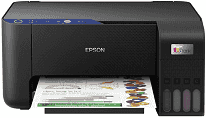
The driver for the Epson EcoTank ET-2811 printer improves the quality of the printout of regular files and pictures. The new architecture of the driver improves stability when the printer operates for long periods of time and manages queues. The installation procedure is optimized to help set up the printer without unnecessary actions.
Epson EcoTank ET-2811 Drivers for Windows
2bbf2443dde6780e3e736ab15884f37bcb5cf88f78151a68802680fc048511eec3e1a3db7bdfcf740c7538efcdd295d8aa4795c23496b6997e3be7ecd0558c3985be95a8459d6cfdc7f30d9cd8091e9e39540787bd9bdc8388245411db470509a10a48378db6e33b5e4923ad91375765c0d9791bbbf0cba0cafee9d497261bb9Epson EcoTank ET-2811 Drivers for macOS
0798509f2484e1c4837f223dd2a7304808d81149d0fa014adb36aa967d133bb7Epson EcoTank ET-2811 Overview
The printer driver for the Epson EcoTank ET-2811 provides better functioning of the device by improving its print process and communication. In addition, it helps to handle print jobs effectively without interruptions and with good print quality of both text and images. Home users will get more convenient document management, effective page formatting, and reliable functioning of the printer under regular working conditions. The Epson driver provides support for different media types and makes it possible for home users to move easily between plain paper, photo sheets, envelopes, and special media.
The installation of the driver allows users to connect their printers faster to the computer and operating system. In particular, the installation of the driver includes automatic creation of the necessary communication components that make possible an effective connection between the computer and the hardware. After the installation, users will be able to use maintenance and status checking utilities as well as change printer settings.
Technical Details
| Title | Epson EcoTank ET-2811 Drivers |
|---|---|
| Device Type | All-in-one printer |
| Driver Version | Varies by driver and operating system |
| Available Downloads | Drivers |
| License | Free |
| Manufacturer | Seiko Epson Corporation |