
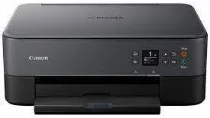
Canon PIXMA TS6420a Driver helps the computer communicate with this wireless all-in-one inkjet for printing, scanning, and copying. After installation, the operating system can identify the machine and route each job to the right function. Wireless setup carries print and scan commands without a USB cable. A direct USB connection can still handle wired setup when needed. Once the link is stable, documents, photos, and scan data can move between the computer and the printer correctly.
Canon PIXMA TS6420a Drivers for Windows
4b977b8c93936900e7b203f1fd5295e9a69e69f43e7026284669730c1a2ffe64cf2a11f09207e4d7ea794dccf5e759c77c214e388ad9a3d498e7d79f2780988c8dd427942e8e31c574841b714286f9171dafe7b49dd781ec9b62ff0cc61cf1a415e26104a051d3f79061242bb8114e3d81f35bbe709d14bb07a6284eb01471d0Canon PIXMA TS6420a Drivers for macOS
4ed11aa9796f5deb32889724bb61141ec86746a34d6b38a1343d1c24c46931f8f50cd696139c11b0868521b4967a6ff8038a89ddc1370c43ca28eee47b2dd1172a961788373db8160e20c89637c07435c80d14a086deb3fefdbaa67bb2e29d167f4c8a20e382512653bb4e5ee1f9c7b4a9565eb805b46e35a0051bdf86ce02932fce1dec3a0da33d47109b9d44b90c5b1f51d2966923570083b295baca4a09cbCanon PIXMA TS6420a Drivers for Linux
25df0050ff000d14ba4efc8dc126d94946181d73cfedfd0708a0c80a8157c5756a5d34f65ece70c7b68cbdf4f2000edc5e85627daf896d27d21dff03dc9839a0d9cadbf705d899762df5e2c2f4714699f8c333a6d812bc59b2b2097ee56503d7f17e6ed1318024a7622eee92d7c772e3e4104b4ebdb16172f777db67cb6fff32091d2dfc914e69554b50a6273c734b8b6a9544c17e2c29aaf92e3b5b8206b6443d208c5bf8bd04b9285f8857ed3272a3371de63df54c31a82cc04158a1b841a4Canon PIXMA TS6420a Specifications
The Canon PIXMA TS6420a is a wireless color inkjet all-in-one printer with printing, scanning, and copying functions. Printing relies on a two-cartridge FINE hybrid ink system for PG-260 pigment black and CL-261 color cartridges, including XL options. The print head carries 1,792 nozzles in total. That split gives 640 pigment black nozzles and 1,152 color nozzles, while local control uses a 1.44-inch OLED display with an LED status bar.
Print resolution reaches up to 4800 x 1200 dpi, while letter-size ESAT speeds run at 13.0 ipm in black and 6.8 ipm in color. A borderless 4 x 6 inch photo takes about 43 seconds. Automatic two-sided printing is available. Scanning relies on a CIS flatbed, with optical resolution at 1200 x 2400 dpi. The flatbed accepts A4 or Letter originals up to 8.5 x 11.7 inches.
Paper feeds through a front cassette and a rear tray, each holding up to 100 sheets of plain paper. The rear tray accepts 20 sheets of 4 x 6 inch photo paper, while sizes include square photo media, 5 x 7, 8 x 10, Letter, Legal, number 10 envelopes, and card size stock. Compatible media covers plain paper, envelopes, glossy photo paper, semi-gloss, matte, magnetic, restickable, greeting card, and iron-on transfer paper.
Connectivity covers Hi-Speed USB, Wi-Fi over 802.11b/g/n, Wireless Direct, Bluetooth 4.0 Low Energy, and Wireless PictBridge. Mobile printing works with AirPrint, Mopria, the Canon PRINT app, Easy-PhotoPrint Editor, Canon Print Service for Android, PIXMA Cloud Link, and Creative Park. With cassette and trays retracted, the body measures about 15.9 x 12.5 x 5.9 inches and weighs about 13.8 lb with FINE cartridges installed.
The scanner bed accepts Letter or A4 originals, while the automatic document feeder takes 35 Letter sheets or 5 Legal sheets. Hi-Speed USB works alongside Wi-Fi 802.11b/g/n, Wireless Direct, Wireless PictBridge, Bluetooth 4.0 Low Energy, AirPrint, Mopria, Canon PRINT, and Canon Print Service. Wireless networking runs on 2.4 GHz. Closed dimensions are 15.9 x 14.4 x 8.2 inches, and the listed weight is 18.1 lb.
Technical Details
| Title | Canon PIXMA TS6420a Drivers |
|---|---|
| Device Type | All-in-one printer |
| Driver Version | Varies by driver and operating system |
| Available Downloads | Drivers |
| License | Free |
| Manufacturer | Canon Inc. |