
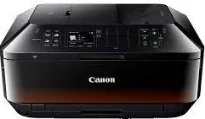
Canon PIXMA MX924 printer model is a multifunction printer with excellent attributes, including printing, copying, scanning, and faxing documents. It has an automatic document feeder (ADF) component that can hold up to 35 pages with a duplex printing component. The machine has a width of 491 mm, a depth of 396 mm, and a height up to 231 mm. The weight is about 11.7 kg, which is ideal for its use in the right environment.
Canon PIXMA MX924 driver Downloads for Microsoft Windows 32-bit – 64-bit and Macintosh Operating System.
Canon PIXMA MX924 Drivers for Windows
8d77363855da20157422dff6d720b564297a6f8d77989c9b9f7b33a9164a70cd2b1aca0ec4cc228aedecef042b948b2e1d91f57e205bcb9e8d8d8ba1b7d586d88dd427942e8e31c574841b714286f9171dafe7b49dd781ec9b62ff0cc61cf1a415e26104a051d3f79061242bb8114e3d81f35bbe709d14bb07a6284eb01471d04c27323034bdeb6d9cd08dfbb061f4fbd561d66faa75305f1a7257d55c9675f4Canon PIXMA MX924 Drivers for macOS
9ca5170bd59ba4becf9477b21b3a92bd3b0d79eeaf1989eb5d8ea3357d50a8380961f013633351953507d0f835e0226e93ccd13fadfa60c3abe6d02fc777d462758d7c7e2a71c32ddf1f246d3c12b8886d6894fe1deac2da8609e4f971e623d7bf67cecd6ff50b8d92c4e2cbed8a4798e90ff631ead65a7d3b7927f1226f6c066cd502b86c6ffe91c569b78de44023b9ae468334ced3b9920ccfef7635a8e08d5743851edadfbb0b8f69c53b46a0b5670389a0e11a69f1bab02385bf178a3fc57e7d7be295ff30e35b7ea942990653d2ef0976aa2890b8238bcc39f841a92a625743851edadfbb0b8f69c53b46a0b5670389a0e11a69f1bab02385bf178a3fc59ed8224d661fc637610941d8c4ee677904a8befd5996b8e518b204f14941e91bf9a2865da420df0d3495a1bead29b3ea5c39fb1fbb650bf273d5b689772b494a4cea4c5c8a6e8967c240218260b3c88512e306570c4268778792de03e74db1910966ce7dc03b277508320ef5fd70712746beef1f4f2f39d71d6dfa7902c01d1bCanon PIXMA MX924 Drivers for Linux
822412389866de3a2478c88338272163ab686e787a30e7127582401aaaa25ca1962189f7d3ccc285b128c982950dc8df30f0a291c1d04a3d5cdcaae1e04f86804f2c4dd169ffe9b86748bba3b7e21e11d32501922ceddac6e3e630f7dcced36f44f7e0ae35093c3c79021ce35faa8d23e013ef7cdc183e395e877965ff6957c0bae404242e8ae09821e11eefdbb28895d7fd3fa0c2933a364c16fa69c0f469e0cf9baa3d0bc5c58db09c0d1b0ac2e312b564f4436fef84bd11fcc0c5f8423ba2Canon PIXMA MX924 Ink Catridge Details
Black Ink Cartridge CLI-451BK, Ink Cartridge Cyan CLI-451C, Ink Cartridge CLI-451Y Yellow, Magenta Ink Cartridge CLI-451M, CLI-451GY Gray Ink Cartridge
In an ideal operating environment, the temperature range is between 5 and 35°C. However, the relative humidity for the same condition is between 10 and 90% with no dew condensation. It produces an acoustic noise level of approximately 44.0 dB (A). The acceptable power source for the machine is between 100 and 240 volts with a 50/60 Hz frequency. On the other hand, the power consumption rate depends on the present printer mode.
For instance, the approximate power usage at the ‘off’ mode is about 0.4 watts. The standby mode is about 1.0 watt when the scanning lamp is off, and the PC is connected through USB. But with all connected ports, the standby mode requires about 2.1 watts with the scanning lamp being off, and copying or printing uses approximately 17 watts while it takes about 7 minutes to enter the standby mode. This machine, Canon PIXMA MX924, can print up to 12000 pages per month for optimum performance.
When the printer is at full operation, the print resolution is up to 9600 x 2400 dots per inch (dpi). Besides, the print engine uses an inkjet print technology, including five single inks, a five-color system. Also, that component has a minimum ink droplet size of 1 picoliter (pl) through the FINE print head and ChromaLife100+. Then, the print speed of the machine depends on the complexity of the document.
Technical Details
| Title | Canon PIXMA MX924 Drivers |
|---|---|
| Device Type | All-in-one printer |
| Driver Version | Varies by driver and operating system |
| Available Downloads | Drivers |
| License | Free |
| Manufacturer | Canon Inc. |