
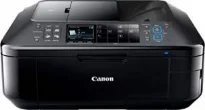
The Canon PIXMA MX895 model features include printing, copying, scanning, faxing, and a 35-page automatic document printing (ADF). The ADF component is applicable to duplex printing, which implies printing on both sides of the page. Other features include camera connection, memory card, mobile device direct printing. It also displays the status of the machine through a 7.5 cm wide color TFT screen. Besides, it supports dual function panel, as well as Wi-Fi and Ethernet connectivity.
Canon PIXMA MX895 driver Downloads for Microsoft Windows 32-bit – 64-bit and Macintosh Operating System.
Canon PIXMA MX895 Drivers for Windows
33047526a1730cbe04e27d6e6839f494a28b12f932293e6d22960a5930431e0a5c566b4885d213f3bd322eed36257fc0661ef628a4cec10e6df733eeeb7e265b993a14c49433af7405e66783233d3bc8ea181f89b8067997cb5fc7592b9c850dCanon PIXMA MX895 Drivers for macOS
fab0a60a508a303927a22ca812d03c50d0707aafbe00cda37ed97970d6cac34274eaaa01b7e3ecef7ce5c7eaf86df61f03fc60da4b098f5f4d09343a0429d2c046f2ee20e30775cc10b101c189700f18b5a8386f688a1fa939ff7cd3b9f2a6a3be987c9bd8987097780ef1d39b2e4e5623af65e17d57ef3db41e57c7a8f34b90573dd777bae01df94493e54bb9e86d6eafe709e31f6819017f600e630db717d75676576ac59bcf010230b04e385525a8eaa737c040a6f5f502735a087016c3ffCanon PIXMA MX895 Drivers for Linux
e2ae7e6565c743862df647cf856f6961be1c9b6c69143e4500715c6a958533edeb1975d5555d3c01e3c775778ad1eecd475951deb65e82983b17c1a8a70535596bd51f1926bb11afaf42633eaed6f0e8ee6424e452a2ca1f746f3146f7bc10bedabb4e8aae576185fb56c2e1ed63cd327e98b1d2e7bf582b3995cd3fd2b4344b5459672e0132dc958fd76f828844020c3e21c9c110012de0c80bfd0cb87a6495ada63d0444630280e4d63ec272e1c25f911c5a4b06463a59d54f565a74d07c2eCanon PIXMA MX895 Supported Ink Catridges
Ink Cartridge Black CLI-526BK, Cyan Ink Cartridge CLI-526C, Ink Cartridge CLI-526M Magenta, Ink Cartridge Yellow CLI-526Y
In terms of the maximum print quality resolution, the maximum production is up to 9600 x 2400 dots per inch (dpi). The machine’s print engine contains a five-single-ink system with five colors and a minimum ink droplet size of 1 picoliter. Also, it is compatible with the FINE print head and ChromaLife100+ system. When the machine is in use, the lab-quality speed in borderless mode is approximately 20 seconds. But monochrome printing is at the rate of 12.5 images per minute (ipm) almost.
However, the color printing speed is about 9.3 ipm while working through the appropriate ink component. The ink cartridge configuration includes compatible models like PGI-525PGBK, CLI-526BK, and CLI-526C/M/Y. By the way, the black ink tank can produce 339 pages, including an estimated suppletory yield. The other cartridge types have respective yield capacities when the machine Canon PIXMA MX895 is performing at the best possible production.
Some of the compatible media types include plain paper, photo paper pro platinum, and photo paper plus glossy II. Also, others are photo paper plus semi-gloss, glossy photo paper “everyday use” (GP-501), and matte photo paper. This machine’s media input capacity includes a rear tray with 150 sheets of plain paper. Besides, there is another cassette that can hold up to 150 sheets. However, the compatible standard media sizes are A4, A5, B5, letter, legal, envelopes, and photo sizes.
Technical Details
| Title | Canon PIXMA MX895 Drivers |
|---|---|
| Device Type | All-in-one printer |
| Driver Version | Varies by driver and operating system |
| Available Downloads | Drivers |
| License | Free |
| Manufacturer | Canon Inc. |