
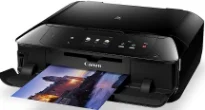
Canon PIXMA MG7760 has a color control panel with a liquid crystal display (LCD) about 3.5 inches in diagonal size. This feature also has a color TFT touch screen as well as an intelligent touch system. It can also follow a dual paper path while supporting the latest operating system versions. Some of the compatible OS versions include Windows XP SP3, Vista SP2, 7, 8, 8.1, 10.1, and some Mac OS versions. The Mac OS options include X 10.7.5 or later versions, and El X Capitan 10.11.
Canon PIXMA MG7760 driver Downloads for Microsoft Windows 32-bit – 64-bit and Macintosh Operating System.
Canon PIXMA MG7760 Drivers for Windows
e1715619910f057fe7511c28d77b29b7f4ebc6d1710534a4cbef359701a85c7ed83f6966d62a17038ede82f03d09060da5121dbb07063d3120cd8766672e5c47a283743ce876ab097418339bdf429971d1f50ebd5b79895bd762c5bba0c4063a8dd427942e8e31c574841b714286f9171dafe7b49dd781ec9b62ff0cc61cf1a415e26104a051d3f79061242bb8114e3d81f35bbe709d14bb07a6284eb01471d0Canon PIXMA MG7760 Drivers for macOS
686ebf8caf4a4db99e776afc193dd86e8ca9e4576dad1fcc956f26031ca65c89f1efa6acf359be14011e875bfd381424f5fda81388b777c8223aad22a7dc460b3e239ef26f1ddcdb36e3f16285998a1e379c51301a3ee8525cf77f0f5b494a17391fea9b8103517faa768962cfb0f79e54d0b9d28a081e52c78401c96cbe2237511df8199951cd3d48d92469449ac548989fe9c193a242788e3d2a509047e624Canon PIXMA MG7760 Drivers for Linux
bec7bb37ce410ea1418a52526f9f7c0e0626979819ce6f7992ef245b37da7dd3df5992a5983f395c1da1be152a2e62128c95bf0e737c1123dc7f4674a0fea5582d7f00f020071a14df5861e1b8dd008d7c9a516fb9276d89954d505833ae728137cad11b1ed7b646b798e0de36585c192ff44849a818f88c0a3daebb4d879dad7bf0dd824d6a6ac44c8b5d53a0cb4b50f6aa398da50cdd7ace18cf0678eaac35e29c5c6ddbcbd2de4f90055023a3676b168703f6f3bf2901bca597522bde93f2Canon PIXMA MG7760 Specifications
This printer Canon PIXMA MG7760 has some outstanding features that enable it to produce an excellent print experience for the users. Some connectivity and printing options include near field communication (NFC) and PIXMA Cloud Link. Users can also use PIXMA Cloud Link available through smartphones, tablets, and printers. Other options include PIXMA.MAXIFY printing solution, Mopria, Apple AirPrint, Google Cloud Print, and Smart device print plugins.
Some of the included software is MP driver, XPS printer driver, easy-web print EX, MyPrinter, Quick Menu, and My Image Garden. In a typical print environment, it has an Ecolabel that supports Energy star certification and EPEAT standard. The power source supports a voltage within the range of 100 and 240 volts at 50/60 Hz. In terms of power consumption, the standard model requires about 0.9 watts.
However, copying with this Canon PIXMA MG7760 machine requires up to 15 watts of power, while the ‘printer off’ mode uses 0.2 watts. In terms of the printer’s physical dimensions, the width is about 435 mm, and the depth is 370 mm while the height is up to 148 mm. On the other hand, the machine’s net weight is approximately 7.9 kg. The interface options include the hi-speed USB 2.0 port and the card slots for appropriate usage.
Technical Details
| Title | Canon PIXMA MG7760 Drivers |
|---|---|
| Device Type | All-in-one printer |
| Driver Version | Varies by driver and operating system |
| Available Downloads | Drivers |
| License | Free |
| Manufacturer | Canon Inc. |