
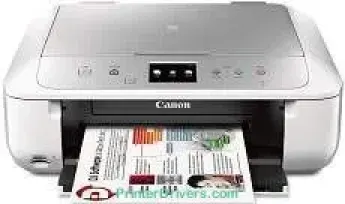
When using the Canon PIXMA MG6822 printer model, the black and white printing process runs at the rate of 15.0 images per minute (ipm). At the same time, color printing in the same mode runs at a rate of 9.7 ipm. Simultaneously, borderless photo printing on a 4 x 6 photo paper size has a speed of 41 seconds on average. The machine also contains up to 4096 nozzles, comprising 3072 nozzles for color printing and 1024 nozzles for pigment black printing.
Canon PIXMA MG6822 driver Downloads for Microsoft Windows 32-bit – 64-bit and Macintosh Operating System.
Ink Cartridge Details: Pigment Black Inkjet Cartridge PGI-270, CLI-271 Black Ink Cartridge, Magenta Inkjet Cartridge CLI-271, Cyan Inkjet Cartridge CLI-271, CLI-271 Yellow Ink Cartridge
Canon PIXMA MG6822 Drivers for Windows
66f62a7a98552bec39a458a0ed4d8289356023dfd63ff42e3afdee265dace938e1804dd432a1030aeecd37f085f231e2e9ff7c753043f40a978dcfb63872834e72fec323999d280a3a606a4ec8bd4f7c069c31dd88a9826915dbbe6b8d50c78a8dd427942e8e31c574841b714286f9171dafe7b49dd781ec9b62ff0cc61cf1a415e26104a051d3f79061242bb8114e3d81f35bbe709d14bb07a6284eb01471d0Canon PIXMA MG6822 Drivers for macOS
e05380b286528fa830baf4fcb6ef2d517cbf4642e6bd3b7c141bf16c867df1eed3fa3dd2ca88c0a3ed77c4e6e3365b39fe4b2a1d6c4ba60ffb93100ea38aa4087e522b30cdbcd4e000b0bd1a25f9382439926983379f7ed5cc416bc84cb83f8bCanon PIXMA MG6822 Drivers for Linux
bec7bb37ce410ea1418a52526f9f7c0e0626979819ce6f7992ef245b37da7dd3df5992a5983f395c1da1be152a2e62128c95bf0e737c1123dc7f4674a0fea5582d7f00f020071a14df5861e1b8dd008d7c9a516fb9276d89954d505833ae728137cad11b1ed7b646b798e0de36585c192ff44849a818f88c0a3daebb4d879dad7bf0dd824d6a6ac44c8b5d53a0cb4b50f6aa398da50cdd7ace18cf0678eaac35e29c5c6ddbcbd2de4f90055023a3676b168703f6f3bf2901bca597522bde93f2Canon PIXMA MG6822 Specifications
This machine produces an average quality of 600 x 600 dots per inch (dpi) for monochrome documents in print resolution. On the other hand, color printing has a maximum quality resolution of up to 4800 x 1200 dpi. Furthermore, the machine is compatible with various ink cartridge models that include the standard and the XL types. The latter is responsible for more print yields from the device.
Below is the list of the compatible cartridge types:
– PGI-270 Pigment Black XL
– CLI-271 Cyan XL
– CLI-271 Yellow XL
– CLI-271 Magenta XL
– CLI-271 Black XL
– CLI-271 Cyan
– PGI-270 Pigment Black
– CLI-271 Magenta
– CLI-271 Black
– CLI-271 Yellow
The printer model can also work smoothly with standard paper sizes, including the US envelopes, photo paper sizes, letter, and legal size. On the other hand, it works with media types such as plain paper, super high gloss, semi-gloss, matte, US envelopes, and chlorine-free paper. Notable printer features may include auto-sided printing, auto photo fix II, borderless printing, document printing, and easy PhotoPrint.
Apart from the standard properties, this machine can also work with mobile printing features such as:
– Mopria printing
– Apple Airprint
– Google Cloud Print
– Web Template print and
– Wireless PictBridge
Technical Details
| Title | Canon PIXMA MG6822 Drivers |
|---|---|
| Device Type | All-in-one printer |
| Driver Version | Varies by driver and operating system |
| Available Downloads | Drivers |
| License | Free |
| Manufacturer | Canon Inc. |