
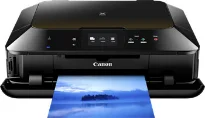
The Canon PIXMA MG6360 model is an exceptional multifunctional printer appropriate as a photo inkjet printer for black printing. It also has some advanced print solutions for producing excellent print, copy, and scan quality. Furthermore, the maximum print resolution is up to 9600 x 2400 dots per inch (dpi) for the best quality. When printing in black and white, the print rate is up to 15.0 images per minute (ipm).
Canon PIXMA MG6360 Drivers for Windows
ba559aea5e3f356c7727f1dcd0307b3e83f892b939066a912c2e2bbf73e1a1cb0ffa69e7a52c1e51a554497c0f117cfcb83baeaee65699fd640429068bc8274e4022aff39b5424ab1d8534f4b41fa27ce15d92e820d20404dba1efca986f9531Canon PIXMA MG6360 Drivers for macOS
e8e44ce566c8e2b7cf6b3d5c35a7eaa2530daff985e862935f39e0cb344553000cf4b14960c281c54380e0df6dc48046f15d059ccb6099f8c06bcd641a4ab1e385bbb86edbab1c23f80e43bff041dc34c6eab79a70b7266fa6466271b69880b2bf401dfef0dfcb35d21fe50afa452d8f3ec144c8564454835c2bbb3ef999546eb4ed5f5ebc0392598d47b884c525cc8c0a5e9af79f423e2be29f555a49cdea7ea4deeb944232b6e3f9378df06d35b889241ea1042ef851c10de02bcf459cd377925500bfea88020e6ada8b117d368d7095519798328a2470e563f31ec1830cc1Canon PIXMA MG6360 Drivers for Linux
c99df6585371f1f491d518bf22d22eed1e35d035630999ecb08fbbe52317c5139e7774afb8e14f52e26894e1e56ee44e092c9b747ce4783250c9ec45f530d9b88b6d408f18191f19465ee8fc31aa08455e8bec186fdd3f02ee822f53a9b086a920b001a926a407685aa904ea8777cf3322e57ce4178f151d6fdb4a4229f0cd13e71ebf4bc77d972d36a4d454a83d3ffd6a0c913e79984a7b3101a1a1af23d1758ab1b3a357064715e97f58d95a10a350135272b1df37cf0428dc535eeb9779dcCanon PIXMA MG6360 driver Downloads for Microsoft Windows 32-bit – 64-bit and Macintosh Operating System.
Ink Cartridge Details: CLI-651XL Black Ink Cartridge, Cyan CLI-651XL Inkjet Cartridge, Ink Cartridge CLI-651XL Grey, Magenta CLI-651XL Ink Cartridge, CLI-651XL Yellow Ink Cartridge
Conversely, the color-printing rate is up to 10.0 ipm while photo printing runs at an average speed of 21 seconds. Some supported paper sizes include A4, letter, A5, B5, DL envelopes, and photo sizes. Besides, the paper load can take up to 125 sheets of plain paper with exceptional quality. Apart from USB printing, this machine can also print through the WiFi PictBridge port for cameras.
On the other hand, the machine Canon PIXMA MG6360 can print from iOS and Android mobile devices through the appropriate app. The speed of copying is up to 14 seconds on average. It supports multiple copies of up to 99 copies of printed-paper amidst some other features. The reduction process can produce an output image of up to 25% of the image size. On the other hand, the copying process can enlarge the output size to 400% of the output size.
Under scanning, some of the notable features include two-sided scanning and disc label. Others include 2-on-1, 4-on-1, frame erase, borderless scanning. In contrast, the appropriate scanning component is the contact image sensor (CIS) element. This model also produces a maximum resolution of 2400 x 4800 optical dpi. Simultaneously, the input/output bit depth for scanning through greyscale is 16bit/8bit for color documents. It also has a color LCD screen of 3.5 inches for diagonal dimensions for the best user experience.
Technical Details
| Title | Canon PIXMA MG6360 Drivers |
|---|---|
| Device Type | All-in-one printer |
| Driver Version | Varies by driver and operating system |
| Available Downloads | Drivers |
| License | Free |
| Manufacturer | Canon Inc. |