
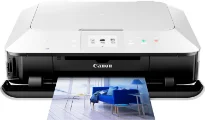
The Canon PIXMA MG6350 printer model is an excellent choice for printing, copying, and scanning documents. The machine has other functions that include printing photo lab-quality photos, double-sided printing, printing on the disc surface, and smartphone and tablet printing. Besides, it supports other mobile printing-related features such as AirPrint support, distribution via the internet, and touch screen operation.
Canon PIXMA MG6350 Drivers for Windows
ba559aea5e3f356c7727f1dcd0307b3e83f892b939066a912c2e2bbf73e1a1cb0ffa69e7a52c1e51a554497c0f117cfcb83baeaee65699fd640429068bc8274e4022aff39b5424ab1d8534f4b41fa27ce15d92e820d20404dba1efca986f9531Canon PIXMA MG6350 Drivers for macOS
e8e44ce566c8e2b7cf6b3d5c35a7eaa2530daff985e862935f39e0cb344553000cf4b14960c281c54380e0df6dc48046f15d059ccb6099f8c06bcd641a4ab1e385bbb86edbab1c23f80e43bff041dc34c6eab79a70b7266fa6466271b69880b2bf401dfef0dfcb35d21fe50afa452d8f3ec144c8564454835c2bbb3ef999546eb4ed5f5ebc0392598d47b884c525cc8c0a5e9af79f423e2be29f555a49cdea7ea4deeb944232b6e3f9378df06d35b889241ea1042ef851c10de02bcf459cd377925500bfea88020e6ada8b117d368d7095519798328a2470e563f31ec1830cc1Canon PIXMA MG6350 Drivers for Linux
c99df6585371f1f491d518bf22d22eed1e35d035630999ecb08fbbe52317c5139e7774afb8e14f52e26894e1e56ee44e092c9b747ce4783250c9ec45f530d9b88b6d408f18191f19465ee8fc31aa08455e8bec186fdd3f02ee822f53a9b086a920b001a926a407685aa904ea8777cf3322e57ce4178f151d6fdb4a4229f0cd13e71ebf4bc77d972d36a4d454a83d3ffd6a0c913e79984a7b3101a1a1af23d1758ab1b3a357064715e97f58d95a10a350135272b1df37cf0428dc535eeb9779dcPIXMA MG6350 driver Downloads for Microsoft Windows 32-bit – 64-bit and Macintosh Operating System.
Ink Cartridge Details
Ink Cartridge Grey CLI-551, Pigment Black PGI-550 Ink Cartridge, Yellow CLI-551 Ink Cartridge, CLI-551 Black Ink Cartridge, Ink Cartridge CLI-551 Magenta, CLI-551 Cyan Ink Cartridge
The printer package box includes the machine itself, six ink tanks, power cord, CD and the printing tray. Other details include the setup guide, software, and user’s manual CD for ease of operation. In printing, the maximum print resolution is up to 9600 x 2400 dots per inch (dpi). It also works with the inkjet FINE print head technology that has a 6-color system. This component has a minimum ink droplet size of 1 picoliter (pl). The ink tank also uses the ChromaLife100+ ink.
While printing in black and white, the document print rate is about 15.0 images per minute. On the other hand, color printing is at a speed of 10.0 ipm. Meanwhile, photo print speed for the borderless mode is about 21 seconds on average. The machine Canon PIXMA MG6350 also supports two-sided printing, which is the auto duplex print for A4, A5, B5, and letter-sized papers. Users can also make use of the direct disc printing through the installed software.
Concerning printing, other essential features include the fit-to-page print, scaled print, multiple page-per-sheet prints, collate, and poster print. The compatible standard individual ink cartridges include PGI-550PGBK and CLI-551C/M/Y/BK for different colors. Apart from the usual cartridges, the optional cartridge models will consist of the XL variations of the models above. The XL cartridge models can produce a more significant number of documents than the standard options. For instance, while the black cartridge prints 1105 pages, the black XL cartridge will create up to 4425 pages.
Technical Details
| Title | Canon PIXMA MG6350 Drivers |
|---|---|
| Device Type | All-in-one printer |
| Driver Version | Varies by driver and operating system |
| Available Downloads | Drivers |
| License | Free |
| Manufacturer | Canon Inc. |